

ChatGPT Prompts for CPAs: The Practitioner’s Guide (US, UK & Canada)
Most ChatGPT prompt guides for accountants are lists. Fifty prompts. A hundred prompts. Copy-paste them and you will save time.
That framing misses what actually matters. The prompts are not the hard part. The hard part is knowing which tasks ChatGPT genuinely accelerates, which tasks it will confidently get wrong, and how to structure your queries so the output requires minimal editing before it reaches a client. Those are the things I have had to figure out across two years of implementing AI workflows for CPA firms in the UK, US, and Canada — and they are what this guide covers.
I have structured this as a practitioner’s guide, not a list. The prompts are organised by when in your workflow you would use them. Each section includes both what to do and what to avoid, because the most expensive ChatGPT mistakes I have seen in practice come from prompts that looked reasonable but generated outputs that slipped through into client deliverables without verification.
One hard boundary before we start: ChatGPT cannot prepare tax returns, calculate tax liabilities, or connect to HMRC, IRS, or CRA systems. It does not know your client’s actual figures. It does not know what tax rules changed last month. Treat it as an intelligent drafter and researcher that requires your professional oversight — not as a junior member of staff who has passed their exams.
Quick Verdict
ChatGPT Plus at $20 per month delivers genuine ROI for CPA firms across five workflow areas: client communication, plain-language explanation, regulatory research (with verification), narrative report drafting, and internal documentation. The setup investment is one afternoon to build a Custom GPT with a firm-specific system prompt. After that, it runs as a consistent tool across your team.
Part 1: The Foundation — Your CPA System Prompt
Every other prompt in this guide works better if you set up a Custom GPT first. A Custom GPT is simply a version of ChatGPT that starts every conversation with a set of instructions you define — your firm’s tone, jurisdiction, professional standards, and output preferences. Without it, every session starts from zero and you spend the first exchange re-explaining context.
Here is the system prompt I use as the base when setting up a Custom GPT for accounting firms. Adapt the bracketed sections to your practice:
You are a professional AI assistant for [FIRM NAME], a CPA practice based in [LOCATION] serving [CLIENT TYPES: e.g. small businesses, high-net-worth individuals, construction firms].

JURISDICTION: Your primary jurisdiction is [US / UK / Canada — choose one as primary, list others as secondary if applicable]. When providing information about tax rates, filing deadlines, or regulatory requirements, default to [PRIMARY JURISDICTION] rules unless the user specifies otherwise.

TONE: Professional and clear. Avoid jargon in client-facing outputs. Use plain language that a business owner without an accounting background can understand. For internal technical outputs, full professional terminology is appropriate.

PROFESSIONAL STANDARDS: You support a licensed CPA practice. All outputs that reference specific tax positions, regulatory citations, or client-specific advice must include a note that they require professional review and verification before use. You do not provide final tax advice — you draft, research, and explain.

DATA HANDLING: Never request or use real client names, Social Security numbers, tax identification numbers, or account numbers. When working with illustrative scenarios, use generic descriptions only: "a UK sole trader" or "a Canadian-controlled private corporation" rather than named individuals or entities.

OUTPUT FORMAT: Unless instructed otherwise, use the following defaults:
- Client emails: professional tone, 150-250 words, plain language, one clear action item
- Internal memos: structured with heading, summary, and numbered points
- Research summaries: key finding first, then supporting detail, source or verification requirement noted at end
- Financial narratives: business owner language, key metric highlighted first, no unexplained accounting terms

JURISDICTIONAL REMINDERS:
- For UK queries: reference HMRC guidance, note Making Tax Digital requirements where relevant, distinguish between income tax and corporation tax contexts
- For Canadian queries: reference CRA bulletins, distinguish between federal and provincial rules, note whether GST/HST applies
- For US queries: reference IRC sections and IRS publications where relevant, note state-level variation where applicable

You flag when a question requires current-year regulatory verification because your training data has a cutoff date and tax rules change annually.
Why this matters: When I set up this system prompt for a 7-person practice in the UK, the team reported that outputs required 40% less editing before use compared to using ChatGPT with no configuration. The jurisdiction defaulting alone eliminates a category of errors where ChatGPT answers a UK tax question with US rules.
Part 2: Client Communication Prompts
Client emails are the highest-volume, most time-sensitive communication task for most practices. They are also where ChatGPT delivers the most consistent value — drafting quality that requires minimal editing, on demand, at any time of day.
New client welcome email
Write a welcome email for a new [sole trader / limited company / S-corp / individual tax client] who has just signed an engagement letter for [bookkeeping / tax preparation / payroll services]. The client is [description: e.g. "a plumber running a one-person business, not financially sophisticated"].

Include:
1. What we will do for them and when
2. What documents we need from them initially (list the 3 most important for their situation)
3. How to reach us and expected response times
4. One sentence on data security and confidentiality

Tone: warm and professional. 200 words maximum. Plain language — no accounting jargon.
Requesting missing documents
One of the most common uses across the firms I work with. The prompt below eliminates the awkward “I need to ask for the fourth time” problem:
Write a professional email requesting the following outstanding documents from a [individual / business] client: [list what is missing].

The client has already been asked once on [date] and has not responded. The deadline for [filing / year-end / quarterly close] is [date], which is [X days away].

Tone: firm but not confrontational. Acknowledge they are likely busy. Be specific about exactly what is needed and by when. Include the consequence of missing the deadline in one sentence without being threatening.

Do NOT use phrases like "as per my previous email" or "as discussed." Keep it under 150 words.
Explaining a surprising tax bill
This is the communication scenario that generates the most client relationship risk. A client opens an unexpected tax calculation and calls before reading it properly.
Write an email to a [entity type] client explaining that their [annual tax bill / quarterly estimated payment / VAT liability] is [amount], which is [higher / lower] than they expected.

Context: [brief explanation of why — e.g. "they had a strong trading year and did not make advance payments" or "a relief they claimed in the prior year does not apply this year"].

Structure the email as:
1. Opening: state the figure clearly in the first sentence
2. Explain why in 2-3 plain sentences — no IRC sections or technical references
3. What happens next (payment deadline, options if they cannot pay)
4. Offer to talk through it

Tone: matter-of-fact, not apologetic. The tax is correct. We are here to help them plan for next year.
Monthly financial summary narrative
Every accountant with bookkeeping clients produces month-end reports. The report generation is handled by QBO or Xero. The narrative that goes with it — that is a different task entirely, and it is where ChatGPT saves 15–20 minutes per client.
Here are the key figures for [CLIENT DESCRIPTION — e.g. "a UK-based retail business, 3 years trading"] for [month/period]:

Revenue: [£X] vs prior month [£X] / vs same period last year [£X]
Gross margin: [X%] vs prior month [X%]
Operating expenses: [£X] — key movements: [describe 1-2 significant changes]
Net profit: [£X]
Cash position: [£X], change from last month: [+/- £X]
Outstanding debtors: [£X], days outstanding average: [X days]

Write a 200-word narrative summary a business owner can understand. Lead with the most important thing — what the numbers mean for the business, not just what they are. Identify one risk or opportunity the owner should be aware of next month. Write for someone who reads their P&L monthly but does not have an accounting background.
Important: Never paste actual client figures with identifying information. The prompt above shows the structure — you fill in the numbers from your QBO or Xero report for a specific client. The narrative output then goes into your monthly report template.
Part 3: Tax Research Prompts
This is the area with the highest ROI and the highest risk. Used correctly, ChatGPT reduces the time to get a first-pass understanding of an unfamiliar tax scenario from 45 minutes to 8 minutes. Used incorrectly, it will produce a plausible-sounding citation to a regulation that does not exist.
The rule I apply in practice: ChatGPT for concept, primary source for citation. Use it to get oriented; verify everything specific.
Explaining a complex provision to a client
Explain [tax concept — e.g. "the UK's Making Tax Digital for Income Tax requirements" / "the US home office deduction under IRC Section 280A" / "Canada's small business deduction"] in plain language for a client who is a [client type].

Include:
- What it is and who it applies to
- The key threshold, deadline, or limit they need to know
- One practical action they should take
- One common mistake people in their situation make

Do NOT: cite specific case law, reference exact threshold amounts (I will verify these), or provide a definitive ruling on whether it applies to their situation — flag that I will need to assess that.
Note the explicit instruction not to cite specific amounts — I add this because threshold amounts (basic rate bands, NIC thresholds, standard deductions) change annually and ChatGPT’s training data is always behind.
Research summary for internal use
I am researching [tax scenario — e.g. "whether a UK limited company director can claim a home office deduction when working remotely"].

Summarise:
1. The general principle under [UK / US / Canadian] tax law
2. The key conditions that must be met
3. Areas where there is ambiguity or where professional judgement is required
4. What sources I should verify this against (HMRC manuals, IRS publications, CRA bulletins — list the relevant reference areas, not specific document numbers)

Do not provide a definitive answer. Give me a structured framework to begin my research. Flag any areas where you believe the rules may have changed recently and I should check current guidance.
Comparison of entity structures
One of the most useful research prompts, particularly for new business clients trying to decide on structure.
Compare the tax treatment of a [sole trader vs limited company / LLC vs S-corp vs C-corp / sole proprietorship vs corporation] for a [description: e.g. "UK-based consultant earning approximately £80,000/year"] considering:

1. Income tax / corporation tax rates at this income level
2. National Insurance / self-employment tax / payroll tax implications
3. Dividend extraction strategy (where applicable)
4. Key administrative requirements and costs
5. Which structure is generally more efficient at this income level and why

Present as a comparison table first, then a 3-paragraph explanation. Note: I will verify all rate figures and thresholds before using this with a client. Flag where rates may have changed since your training data.
Drafting a CP notice or HMRC correspondence response
A client has received [describe the notice — e.g. "an IRS CP2000 notice proposing changes to their 2023 return" / "an HMRC compliance check letter regarding their employment income"]. The notice relates to [brief description of the issue].

Draft a professional response letter that:
1. Acknowledges receipt and states we are responding on behalf of [our client description]
2. Clearly states our position in one opening paragraph
3. Presents the supporting facts and explanation
4. Requests [specific outcome — e.g. "that the proposed adjustment be removed" / "clarification on the specific information requested"]
5. Closes professionally with our contact details

Tone: professional and co-operative. Not defensive. Facts first.

Note: This is a draft only. I will review all factual claims, verify all regulatory references, and add specific dates and amounts before sending.
Part 4: Advisory and Planning Prompts
This is where ChatGPT’s value for experienced practitioners is highest — not replacing advisory work but dramatically reducing the time to structure a framework that you then apply professional judgement to.
Year-end planning checklist
Generate a year-end tax planning checklist for a [entity type and jurisdiction — e.g. "US S-corporation with 3 shareholders, fiscal year ending December 31"]. The business has [brief characteristics: e.g. "significant equipment purchases this year, one shareholder planning to retire in 18 months, and profit that is approximately 20% higher than last year"].

Structure the checklist by:
1. Items to action before year-end (time-sensitive)
2. Items to review with the client at year-end meeting
3. Items to monitor for next year

For each item, include a one-sentence explanation of why it matters. Flag where specific thresholds need to be verified against current-year rules.
Cash flow forecast narrative
I need to present a 12-month cash flow projection to a [business type] client who is [situation: e.g. "considering taking on a significant new contract that would require hiring two additional staff"].

The key assumptions are: [list 3-4 key assumptions — revenue growth rate, major expenses, payment terms].

Write a 300-word executive summary of the projection that:
1. States the key conclusion in the first sentence (will cash be adequate / what is the risk period)
2. Explains the 2-3 main drivers of the cash position
3. Identifies the highest-risk scenario and what would trigger it
4. Recommends one or two specific actions

Write for a business owner, not a banker. Avoid the word "utilize."
Engagement letter for a new service
Draft an engagement letter for [new service: e.g. "providing monthly management accounts and quarterly advisory reviews to a limited company client in the UK"].

Include:
- Scope of services (be specific about what is and is not included)
- Our responsibilities and the client's responsibilities
- Fee structure (I will insert actual figures)
- Confidentiality and data protection (GDPR/UK GDPR reference for UK clients)
- Limitation of liability clause (standard professional services language)
- Termination provisions

Format: formal letter, signed sections at the bottom for both parties. UK professional tone.

Note: I will have our professional indemnity insurer review any liability limitation language before use.
Part 5: The Red Zone — Prompts That Will Get You Into Trouble
This is the section most guides skip. In my experience working with firms that have had problems with AI-generated content, the issue is never the obviously risky queries (“calculate my client’s tax bill”). It is the prompts that look like research but produce outputs that slip through review unchecked.
Red zone: specific threshold amounts and rates
Dangerous prompt:
“What is the UK basic rate tax band for 2025-26 and what is the National Insurance threshold?”
Why it is dangerous: ChatGPT will give you a specific number with total confidence. That number may be from a previous tax year, or from a pre-budget announcement that was subsequently changed, or simply wrong. The output looks authoritative and passes a casual review.
Safe version: Ask for the framework, not the number.
“What factors determine UK income tax rate bands, and what is the HMRC reference I should check for current 2025-26 thresholds?”
Then verify at gov.uk/income-tax-rates or the equivalent current HMRC guidance.
Red zone: specific IRC section citations
Dangerous prompt:
“Which IRC section governs the home office deduction and what are the specific requirements?”
ChatGPT will answer correctly that it is Section 280A — that part is well-established. The danger is in follow-up questions about specific exceptions, recent case law interpretations, or IRS guidance memoranda. By late 2025, researchers had documented nearly 800 cases of AI-generated citation errors in legal and tax proceedings globally. In the tax context specifically, the problem is that IRC citations follow a predictable alphanumeric pattern that ChatGPT can mimic convincingly.
Rule: Any specific IRC section, Treasury Regulation, Revenue Ruling, or IRS Notice cited by ChatGPT must be verified at irs.gov before appearing in any client deliverable or correspondence.
Red zone: recent legislative changes
The OBBBA (One Big Beautiful Bill Act) — the US tax legislation passed in 2025 — is a clear example. Rules regarding tipped income deductions, child tax credit expansions, and state and local tax deduction caps changed materially. ChatGPT’s training data may predate these changes or reflect pre-passage proposals rather than enacted law.
Rule for 2026: For any query relating to tax rules that could plausibly have changed in the past 18 months, enable ChatGPT’s web search feature before asking, or verify the output against a current-year primary source before use.
Red zone: Canadian provincial rules
Canadian tax law involves federal rules from the CRA and provincial rules that vary substantially — Quebec operates its own income tax system entirely. ChatGPT’s coverage of provincial-federal interaction is weaker than its coverage of federal rules, and provincial-specific guidance (Ontario’s small business deduction rate, BC’s employer health tax threshold, Quebec’s QST rules) generates more errors than federal content.
For Canadian queries: always specify federal vs provincial, always verify provincial thresholds at the relevant provincial finance ministry website, and for Quebec clients specifically, treat ChatGPT outputs with additional scepticism.
Red zone: Circular 230 and “written advice”
This is the one that matters for US practitioners who use ChatGPT to draft client-facing tax advice documents. Under IRS Circular 230, practitioners providing written tax advice must meet specific standards including consideration of all relevant facts and not relying on unreasonable assumptions. The CPA Journal noted that ChatGPT’s “written advice” generated under Circular 230 “would presumably be based on unreasonable factual or legal assumptions” given its known hallucination tendencies.
The practical implication: ChatGPT-drafted content that conveys a specific tax position to a client must be reviewed and rewritten to the point where you can certify it under your professional standards — not lightly edited. This is still faster than starting from a blank page, but the review step is not optional.
Part 6: Integrating ChatGPT Into Your Existing Workflow
The question I get most often from CPA firms that are new to AI tools is not “which prompts should I use?” It is “where does this fit in our existing process?” The answer depends on your current stack.
If you use Dext + QBO/Xero
The workflow that saves the most time: Dext captures and codes the documents → QBO or Xero generates the financial reports → ChatGPT drafts the narrative that goes with those reports.
The key is never pasting raw transaction data from Dext or QBO into ChatGPT. The input to ChatGPT should be aggregated financial figures (revenue, expenses by category, key movements) — the kind of data that appears in a month-end summary report, not individual transaction lines. This keeps client-identifying information out of the chat interface while still allowing ChatGPT to generate the commentary that transforms a numbers table into a client-readable narrative.
If you use TaxDome
TaxDome’s AI features handle a subset of what ChatGPT does — primarily client communication templates and engagement letter generation within the platform. The two tools are complementary rather than competing: TaxDome AI for structured workflow communications within the TaxDome ecosystem, ChatGPT for ad hoc drafting, research, and content that lives outside TaxDome.
If you use Karbon
Karbon AI handles email summarisation and prioritisation directly within the inbox. This means the communication drafting use case for ChatGPT overlaps with Karbon AI for firms on that platform. The non-overlapping value of ChatGPT for Karbon users: tax research, plain-language explanations for clients, and narrative report writing — none of which Karbon AI handles natively.
Which Tool Is Right for You?
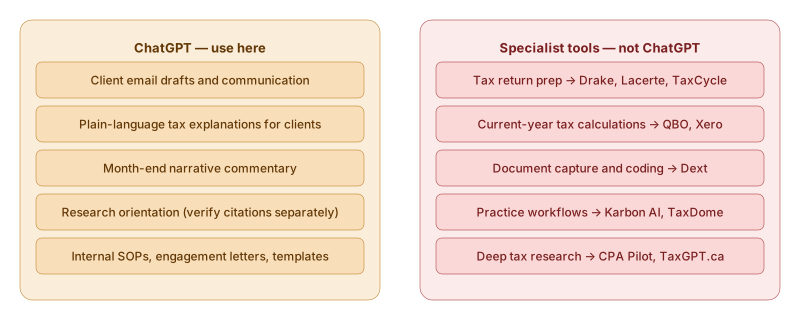
Use ChatGPT for: client communication drafts, plain-language tax explanations, research orientation (not final citation), month-end narrative commentary, internal documentation, engagement letters and SOPs.
Do not use ChatGPT for: tax return preparation, calculating specific tax liabilities, anything requiring current-year figures you have not verified independently, final written advice under Circular 230 or equivalent professional standards.
Consider specialist tools instead for: deep tax research (CPA Pilot, TaxGPT.ca for Canadian queries), practice management workflows (Karbon AI, TaxDome AI), document capture and coding (Dext — not a ChatGPT use case).
The $20/month sweet spot: ChatGPT Plus pays for itself on the first client email it drafts well enough to send with minimal editing. For a firm sending 50+ client communications per week, the time saving is measurable within the first month. The system prompt investment — one afternoon to set up — determines whether the tool delivers that consistently or inconsistently.
A Note on Data Security
A Dext-commissioned survey of 500 Canadian accountants found that 50% were aware of businesses that had suffered direct financial losses from incorrect AI-generated advice, and that 44% of accountants encountering AI-related mistakes spent up to three hours per month correcting errors.
The lesson is not to avoid ChatGPT — it is to use it for the right tasks with the right verification discipline. The firms that are behind in 2026 are not the ones that used AI and got a prompt wrong. They are the ones that never started.
This is not financial, legal, or tax advice. Tax rules referenced in this guide change annually — verify all thresholds, rates, and regulatory citations against current primary sources before using in client work. Circular 230 practitioners should review AI use policies under AICPA SSTS and IRS Circular 230 before deploying AI-generated content in written client advice.
Last reviewed: March 2026. Spotted an error or a better prompt? Write to info@kynledger.com.