

AI Bookkeeping Software for CPA Firms Managing Multiple Clients in 2026
Most AI bookkeeping guides are written for a business owner who wants their one company’s books done faster. That is a useful comparison for a single-entity small business. It is not the comparison a CPA firm needs when evaluating tools for a portfolio of 15, 25, or 50 client accounts that all need to be kept current, all need monthly closes, and all need a consistent standard of accuracy.
The workflow is different. The economics are different. The failure modes are different.
A business owner on QBO cares whether their bank reconciliation is fast. An accountant managing 30 QBO client files cares whether they can process exceptions across all 30 simultaneously — without logging into each file in sequence, without rebuilding categorisation rules from scratch on every new client, and without a tool that charges $200 per month per client making the economics unworkable.
This guide covers AI bookkeeping software from the CPA’s perspective: multi-client management, per-client pricing economics, and the three-layer decision framework that determines which type of tool is right for which practice.
Quick Verdict
Booke AI is the most cost-effective software overlay for CPA firms that want to automate transaction categorisation and reconciliation across multiple QBO and Xero clients without outsourcing control. At $20–50 per client per month with no annual contracts, the economics work for practices managing 5–50 client books. Native AI in QBO (Intuit Assist) and Xero (JAX) is the free ambient layer that every accountant’s clients already have — configure it properly before adding paid tools on top. Digits is the right evaluation for practices onboarding new clients who are not locked into QBO or Xero and want an AI-native general ledger from the start. CodeIQ is the service-layer option for practices wanting to hand off multi-client bookkeeping entirely rather than manage AI tooling themselves.
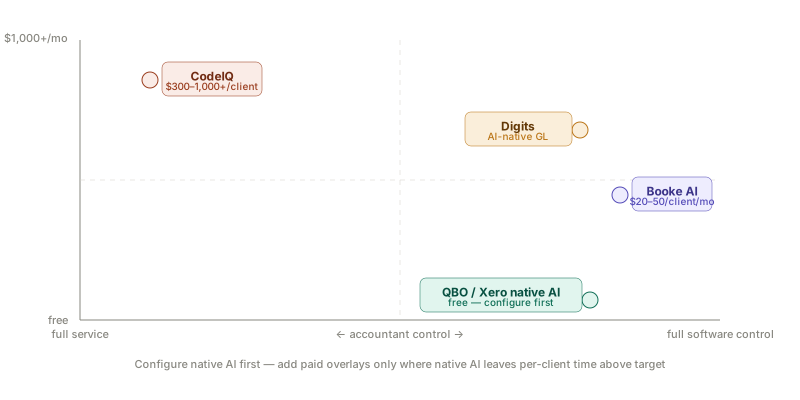
The Three-Layer Decision Framework
Before the tools: the framework. The mistake most CPA firms make when evaluating bookkeeping automation is treating it as a single-layer decision — “which bookkeeping software should I use?” The reality is that there are three distinct automation layers, and the right choice depends on which layers are already covered and where the actual bottleneck is.
Layer 1 — Document capture: Gets invoices, receipts, and bank statements into the accounting system accurately. Dext Prepare, Hubdoc, AutoEntry. This layer is separate from the bookkeeping layer and is covered in our Hubdoc alternatives comparison.
Layer 2 — Transaction coding and reconciliation: The core bookkeeping work — categorising GL transactions, matching bank feed items, reconciling accounts. This is where most AI bookkeeping tools operate, and where this guide focuses.
Layer 3 — Close and review: Confirming the period’s books are accurate, preparing financial statements, flagging variances. Covered in our AI month-end close tools guide.
A firm that buys Booke AI without having Layer 1 configured (clean data flowing in via bank feeds) will see lower automation rates than the headline figures suggest. A firm that buys a full-service coding platform when their only gap is Layer 3 review speed is overpaying for the wrong layer. Diagnose the actual bottleneck before buying.
Side-by-Side Comparison
| Tool | Layer | Multi-client dashboard | Accuracy | Per-client cost | Contract |
|---|---|---|---|---|---|
| Booke AI | Coding + reconciliation | ✓ | 95% (steady state) | $20–50/mo | Monthly |
| Intuit Assist (QBO) | Coding (suggestions) | Via QBO Accountant | Variable | Free | — |
| Xero JAX | Coding + reconciliation | Via Xero HQ | 80%+ (established) | Free | — |
| Digits | Full GL (AI-native) | ✓ | 96.5% | Varies | Annual |
| CodeIQ | Full service (software + humans) | ✓ | High | $300–1,000+/mo | Bespoke |
1. Booke AI — Best Software Overlay for Multi-Client Practices
Booke AI is the tool I recommend first to practices that want to automate multi-client bookkeeping without outsourcing control or paying enterprise prices. It connects to QuickBooks Online, Xero, and Zoho Books, processes transactions across all connected client files simultaneously, and uses GPT-4 for categorisation — not rule-based keyword matching.
The key numbers: 95% autonomous transaction handling at steady state. Processing speed 80% faster than manual. Per-client pricing of $20 per month for basic automation or $50 per month for the full Robotic AI Bookkeeper feature set. No annual contracts. No upfront payment.
For a practice managing 20 clients, the basic tier costs $400 per month total — roughly the equivalent of 4–5 hours of bookkeeper time at standard rates. If the tool saves more than 4–5 hours of bookkeeping per month across the portfolio, the ROI is immediate.
Pricing
Booke AI charges per client, per month, with two tiers. The basic plan at approximately $20 per client per month covers AI transaction categorisation and reconciliation. The Robotic AI Bookkeeper plan at approximately $50 per client per month adds autonomous document processing and more advanced exception handling. No annual contracts — month-to-month pricing with the ability to add and remove clients as the portfolio changes.
This pricing structure is specifically designed for CPA firms with variable client portfolios. The absence of annual contracts is meaningful: if you onboard a new client in October and offboard them in March, you pay for 5 months, not 12.
What Works Well
GPT-4 categorisation learns from corrections, not just rules. Traditional bookkeeping automation relies on keyword rules: if the transaction description contains “Amazon,” categorise as “office supplies.” This breaks on ambiguous descriptions, multi-word suppliers, and transactions that cross categories. Booke AI’s GPT-4 layer understands context — it categorises a transaction from “Amazon Web Services” differently from “Amazon Marketplace” based on the client’s industry and prior correction patterns, without a separate rule for each.
Multi-client dashboard processes exceptions across the portfolio. Rather than logging into each client file in QBO or Xero sequentially, Booke AI surfaces all pending exceptions from all connected clients in one view. You review and approve categorisation suggestions, handle reconciliation queries, and flag client-specific issues from a single screen. For practices managing 15+ clients, this workflow shift is where the real time savings materialise.
Per-client economics that scale. At $20–50 per client per month, the cost per client decreases as a percentage of your bookkeeping fee as volume grows. A practice billing $200 per client per month for bookkeeping services, using Booke AI at $50 per client, keeps a 75% gross margin after tool cost. That margin improves as the tool covers more of the workflow and less human time is required per client.
Multi-language and multi-currency document processing is genuinely capable — Booke AI processes documents in any language or currency, extracting data and posting entries correctly. For practices serving international SMB clients or handling cross-border supplier invoices, this removes a significant source of manual correction.
I have seen Booke AI used effectively by a 4-person UK practice in Birmingham managing 28 SMB bookkeeping clients on Xero. Before deployment, each client took an average of 3.5 hours per month of bookkeeper time. After 90 days with Booke AI handling initial categorisation, average time dropped to 1.2 hours per client — primarily exception review and month-end sign-off. At their standard rate, that freed capacity allowed them to onboard 8 additional clients without hiring.
What Does Not Work Well
Accuracy is lower on new clients. The 95% autonomous processing figure applies to established accounts with 3–6 months of correction history. New client onboarding typically runs 70–80% autonomous in the first month, requiring more exception review than the headline figure suggests. Budget for higher oversight time in the first 60–90 days on any new client.
Limited practice management integration. Booke AI handles the bookkeeping layer. It does not connect to TaxDome, Karbon, or other practice management platforms. Exception flags from Booke AI do not automatically create tasks in your practice management workflow — that handoff is manual. For practices using Karbon AI Agents for workflow automation, the two platforms operate in parallel rather than in an integrated sequence.
QBO and Xero dependency. Booke AI works as a layer on top of these platforms — it does not replace them. If your clients are on Sage, FreshBooks, or desktop accounting software, Booke AI’s integrations are more limited.
Booke AI Pros and Cons
Pros:
- $20–50/client/month with no annual contracts — most flexible pricing model on this list
- GPT-4 categorisation improves with corrections — no rule maintenance
- Multi-client exception dashboard eliminates sequential file-by-file workflow
- Processes documents in any language and currency
- QBO and Xero native integrations with real-time sync
Cons:
- New client accuracy is 70–80% for first 60–90 days — not 95% from day one
- No direct integration with TaxDome or Karbon practice management
- Requires QBO or Xero as underlying GL — not a standalone platform
The most cost-effective AI coding and reconciliation overlay for CPA firms on QBO and Xero — GPT-4 categorisation with no rule maintenance, multi-client exception dashboard, and per-client pricing that works at any portfolio size from 5 to 50 clients.
2. Native AI — The Free Layer You Already Have
Before adding any paid bookkeeping automation tool, there is a free layer that most accountants underutilise: the AI already built into QBO and Xero.
Intuit Assist in QuickBooks Online provides AI transaction categorisation suggestions, anomaly detection, and natural language financial queries within each QBO client file. It is not a replacement for multi-client management tooling — it operates per-file, and the suggestions still require review and approval. But for practices whose clients have well-established transaction patterns and relatively low monthly volumes (under 200 transactions), Intuit Assist at zero marginal cost covers the majority of categorisation work.
Xero JAX — launched September 2025 — is more capable than Intuit Assist on the reconciliation side. JAX’s bank reconciliation predictions on well-established Xero files achieve 80%+ automation rates, meaning the accountant reviews suggested matches rather than manually matching items. Xero’s own published figure for JAX on mobile-linked accounts is 80% reconciliation time savings. This is ambient value already inside your clients’ Xero subscriptions.
When native AI is sufficient: Low-to-moderate transaction volume clients (under 200 transactions per month) with 12+ months of transaction history on the platform. Consistent recurring suppliers and well-configured bank feeds. The 2–3 hours of monthly bookkeeping time required for these clients does not justify a $20–50 per month per client overlay.
When native AI is not sufficient: High-volume clients (200+ transactions monthly), clients with complex multi-category suppliers, new clients without transaction history, and any situation where the exception review time still exceeds 1 hour per client per month after native AI is applied. This is the gap where Booke AI or a dedicated coding platform adds value.
The practical test: run a native AI configuration on your highest-volume client for one month and measure exception review time. If it drops below 60–90 minutes per month, the free layer is sufficient for that client. If not, the paid overlay ROI is calculable.
3. Digits — Best AI-Native GL for New Client Onboarding
Digits is a newer generation accounting platform built from scratch with AI at its core rather than AI added to an existing bookkeeping system. Digits reports 96.5% auto-booking accuracy for transaction categorisation, along with a modern interface, AI bill pay, invoicing, and real-time financial dashboards.
The distinction from Booke AI is architectural: Booke AI is a layer on top of QBO or Xero, enhancing their AI capabilities. Digits is the general ledger itself — it replaces QBO or Xero for clients you onboard onto it.
When Digits Makes Sense
Digits is most relevant when onboarding new clients who are not already committed to QBO or Xero. For an existing client on QBO with 3 years of transaction history, migrating to Digits creates disruption and data migration complexity that rarely justifies the AI capability improvement. For a new client starting from scratch — a recently incorporated company, a client migrating from spreadsheets, or a referral without existing accounting software — Digits offers a modern AI-first experience that may be preferable to setting up QBO.
The limitation for multi-client CPA practices: Digits’ multi-client dashboard and practice management features are less mature than QBO Accountant’s. The ecosystem of third-party integrations (payroll, CRM, expense management) is also narrower than QBO’s. Adopting Digits firm-wide means diverging from the QBO-dominant ecosystem that most US accounting talent knows and most clients already use.
Digits Pros and Cons
Pros:
- 96.5% auto-booking accuracy — highest reported accuracy on this list
- AI-native architecture — not AI bolted onto legacy infrastructure
- Modern interface with real-time dashboards including burn rate and runway
Cons:
- Smaller integration ecosystem than QBO or Xero
- Multi-client practice management features less mature
- Works best for new client onboarding, not migrating established clients
The right evaluation for new client onboarding where QBO lock-in is not yet a factor — AI-native GL with 96.5% auto-booking accuracy and modern real-time dashboards.
4. CodeIQ — Full-Service Multi-Client Bookkeeping
CodeIQ is a managed bookkeeping service built specifically for CPA firms managing 20 or more bookkeeping clients. Rather than software you operate, it is a service that combines AI automation with human oversight to deliver reviewed, accurate books for each client in your portfolio.
The commercial model is service-priced: bespoke contracts typically running $300–1,000+ per client per month depending on transaction volume and complexity. This positions it at the top of the cost range — but for practices whose bottleneck is accountant time rather than cost, the ability to take on additional bookkeeping clients without proportional hiring is the relevant metric.
For the majority of practices, CodeIQ’s pricing makes it a specialised option rather than a default tool. It is worth evaluating when: bookkeeping revenue per client exceeds $600 per month and you have more demand than capacity; your firm wants to focus entirely on advisory and outsource the bookkeeping execution; or your client portfolio includes complex multi-entity structures that exceed what software overlays handle reliably.
For a detailed view of multi-client bookkeeping automation at the service layer, including Xendoo’s Botkeeper Infinite acquisition and what it means for practices that were on Botkeeper, see our Botkeeper alternatives guide.
The Multi-Client Economics Calculation
The calculation that should drive the tool selection decision is straightforward. For each client:
Current bookkeeping time per month × hourly staff cost = current cost per client
Tool cost per client per month + (reduced time post-automation × hourly cost) = post-automation cost per client
If (current cost) - (post-automation cost) > (tool cost), the investment pays. At what client count does it break even?
For Booke AI at $50/client on a client currently requiring 3 hours of bookkeeping at a $40/hour fully-loaded staff cost:
- Current cost: $120/client/month
- Post-automation (1 hour exception review): $40 + $50 = $90/client/month
- Net saving: $30/client/month
- Break-even: immediate
For the same client on native QBO AI that reduces time to 1.5 hours:
- Post-automation: $60/client/month
- No additional tool cost
- Net saving: $60/client/month — better than Booke AI if the native layer delivers that reduction
The decision is empirical, not theoretical. Run the native AI configuration first. Measure the time reduction. Add paid overlays only where native AI leaves the per-client time above your target.
Which Tool Fits Which Practice?
Solo practitioner or 2-person practice (5–15 clients): Configure Xero JAX or QBO Intuit Assist fully before adding any paid tool. At this scale, the native AI is often sufficient for low-to-moderate transaction volume clients. Add Booke AI for clients consistently requiring 2+ hours of monthly bookkeeping after native AI is applied — it will pay for itself within 2–3 months.
Small practice (3–8 staff, 15–40 clients): Booke AI at the $20–50/client tier, applied selectively to your highest-volume clients first. Run the economics calculation per client rather than applying the same tool to the entire portfolio — some clients will not justify the per-client cost.
Growing practice (8+ staff, 40–80+ clients): Multi-client bookkeeping automation becomes essential at this scale rather than optional. Booke AI or a similar overlay across the full portfolio, combined with the native AI in QBO/Xero as a baseline. For practices with significant new-client onboarding volume, evaluate Digits for those relationships specifically.
Practices considering full-service outsourcing: CodeIQ’s model makes sense when advisory capacity is the constraint, not tool operating time. If your team’s value is in the advisory conversation and not in the bookkeeping workflow, paying $300–600/client/month to outsource the execution to a service is commercially rational — provided your client billing rates support the margin.
A Note on Vendor Risk After Botkeeper
The Botkeeper shutdown in February 2026 deserves a direct mention in any AI bookkeeping evaluation. A well-funded, technically capable platform with thousands of accounting firm clients disappeared within days of a revenue concentration problem. The firms most disrupted were those that had built deep workflow dependencies on Botkeeper without maintaining data portability.
The structural lesson for evaluating bookkeeping automation in 2026: favour tools where your data stays in a portable format (QBO or Xero are the safest repositories), where pricing is transparent and not dependent on a single commercial arrangement, and where the tool is a layer on your existing stack rather than the stack itself.
Booke AI as a QBO/Xero overlay means your client data remains in the platforms your clients own and can access directly. If Booke AI were to shut down, your client books would continue in QBO or Xero with no data loss. That portability is a structural risk management feature that full-service platforms and AI-native GLs cannot fully replicate.
Booke AI pricing verified from multiple sources as of May 2026 — pricing may have changed, verify current rates at booke.ai. Digits pricing requires a direct quote. CodeIQ pricing is bespoke by engagement.
This is not financial advice. Last reviewed: May 2026.