

Best AI Tools for Canadian Accountants and CRA Compliance 2026
Canadian accountants face a compliance burden that their US counterparts do not. GST/HST applies at different rates across provinces, with place-of-supply rules that change depending on where goods are delivered. T4, T4A, T5, and T2 filings each carry their own CRA deadlines. Electronic filing has been mandatory for most GST/HST registrants since 2024. And the CRA itself is now using AI to cross-reference returns and flag discrepancies more aggressively.
The result is that the tools you choose to run a Canadian practice are not interchangeable with what works in the US or UK. You need platforms that understand Canadian tax codes natively — not ones bolted on as an afterthought.
This roundup covers the six AI-enhanced tools that matter most for Canadian accountants in 2026: the cloud bookkeeping platforms that handle GST/HST and bank reconciliation, the tax-filing software that speaks CRA’s language, the document capture layer that connects clients to the ledger, and the anomaly detection platform built in Ottawa for audit and advisory work. All pricing is in Canadian dollars where publicly available.
Quick Comparison
| Tool | Best for | CRA compliance | Starting price | Free trial |
|---|---|---|---|---|
| QuickBooks Online Accountant | Multi-client practices, QBO-first | GST/HST, T4, payroll | ~CAD $25/mo (client plans vary) | ✓ 30 days |
| Xero Canada | Automation, unlimited users | GST/HST, bank feeds, T4 integrations | CAD $20/mo (Starter) | ✓ 30 days |
| TaxCycle | T1/T2/T3/T4 filing, EFILE | EFILE-certified, all CRA forms | ~CAD $2,605/yr (1-user suite) | ✓ |
| Dext | Document capture, pre-accounting | Pairs with QBO/Xero for ITC tracking | Custom / per-client | ✓ 14 days |
| MindBridge AI | Anomaly detection, audit | Audit standards CAS 240 / ISA 240 | Custom enterprise | ✗ |
| TaxGPT.ca | CRA question lookup, tax research | Canada-specific training data | Free / paid tiers | ✓ |
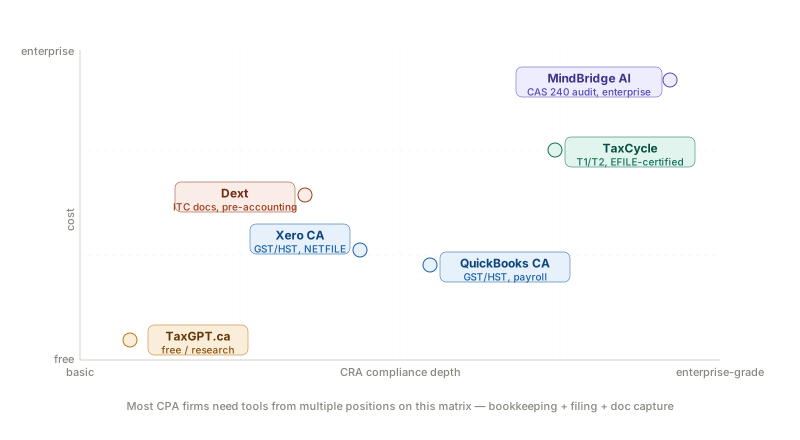
What CRA Compliance Actually Requires from Your Tech Stack
Before evaluating individual tools, it is worth being specific about what “CRA compliance” requires in practice. It is not a single feature — it is a stack of distinct obligations, each of which needs a different solution.
GST/HST tracking and remittance — Every transaction needs the correct tax code applied based on province, and returns must be filed via NETFILE or My Business Account. From 2024, electronic filing is mandatory for most registrants.
T4 and payroll slips — Must be issued to employees and filed with the CRA by 28 February each year. Payroll platforms and tax software handle this; core bookkeeping platforms do not file them directly.
T2 corporate returns — Filed using CRA-certified software. Intuit’s ProFile, TaxCycle, and Taxprep are the three dominant platforms. Cloud bookkeeping platforms like QuickBooks and Xero do not file T2 returns.
Record retention — The CRA requires records to be kept for six years from the end of the last tax year they relate to. Cloud platforms with audit trails satisfy this, but export and backup protocols matter.
Input Tax Credits (ITCs) — Proper receipt capture and supplier documentation is required to claim ITCs on GST/HST paid. This is where document capture tools like Dext become compliance-critical, not just convenient.
The right tech stack for a Canadian CPA firm typically combines a cloud bookkeeping platform (QBO or Xero) with a CRA-certified tax filing suite (TaxCycle or ProFile) and a document capture tool (Dext). AI features are increasingly embedded across all three layers.
QuickBooks Online Accountant (QBOA)
QuickBooks Online is the dominant bookkeeping platform for Canadian small businesses, and the Accountant version gives CPA firms a centralised dashboard to manage all client entities without switching between accounts.
For CRA compliance, QuickBooks Online Canada handles GST/HST, HST, and PST calculations automatically. It applies the correct provincial rate based on your place-of-supply settings and generates NETFILE-ready GST34 summaries at filing time. Bank feeds connect directly to Canadian banks including RBC, TD, BMO, Scotiabank, and CIBC. From 2026, the platform includes AI agents that learn your transaction categorisation patterns and apply them automatically — reducing manual review on recurring supplier payments.
T4 and payroll integration runs through Intuit’s payroll module or third-party providers such as Wagepoint, ADP Canada, and Ceridian. QBOA also provides access to ProFile (Intuit’s CRA-certified tax software) for T1, T2, and T3 filings, creating a single vendor relationship for the full compliance stack.
The AI categorisation works well once trained on a client’s transaction history — based on user reviews on G2 and Capterra, most practices report that 70–80% of recurring transactions are coded without manual intervention after two to three months of use. The catch is that initial setup is time-intensive for complex clients with multi-category suppliers.
Where it falls short: QuickBooks Online Canada does not support more than five users on standard plans — a meaningful constraint for practices with larger teams. The QST rules for Québec-based clients require additional configuration and are not as automated as GST/HST handling in other provinces.
Pricing: QuickBooks Online plans for small businesses start at roughly CAD $25/month. QBOA access for accountants is free, but client subscription costs apply. Payroll is an add-on.
Pros: Market-leading Canadian bank feeds, GST/HST auto-calculation, NETFILE-ready reporting, strong payroll integrations, free QBOA dashboard for practices.
Cons: 5-user cap on standard plans, Québec QST requires manual configuration, payroll is an add-on cost, AI categorisation requires training period before producing reliable suggestions.
Free QBOA dashboard for practices with built-in GST/HST tracking and NETFILE-ready returns — the most widely used CRA-compliant platform in Canada.
Xero Canada
Xero is the platform most commonly cited by Canadian accountants switching away from QuickBooks — primarily for two reasons: unlimited users on all pricing tiers, and stronger automation for firms that want less manual categorisation work.
Xero Canada ships pre-configured with GST/HST tax codes for every province and territory. It automatically applies the correct rate based on the customer’s location and generates GST/HST return reports aligned with CRA filing requirements. Canadian bank feeds cover all major institutions. The platform’s AI engine suggests transaction categorisations based on historical patterns, and bank rules allow automatic coding for recurring transactions once set up.
For Québec-based practices, Xero handles GST and QST (at the combined rate of 14.975%) natively — a meaningful advantage over QuickBooks for firms with significant Québec client exposure. Xero also integrates with Canadian payroll providers including Wagepoint, Rise People, and Ceridian, and automates T4 and T4A summary preparation through those integrations.
The Xero–TaxCycle integration is one of the most practical combinations for Canadian CPA firms. TaxCycle can import GIFI data directly from Xero into T1 (T2125 and T776 forms), T2 corporate, and T5013 partnership returns — removing the manual extraction step that costs firms hours at year-end. TaxCycle customers also qualify for a free Xero partner account.
Where it falls short: Xero does not file directly with the CRA. You prepare the numbers in Xero and file via NETFILE or My Business Account. Some Canadian accountants note that Xero’s payroll integration options are narrower than QuickBooks’ direct payroll module, and that the Québec-specific RL-series slips require third-party integrations rather than being native.
Pricing: Xero Canada plans start at approximately CAD $20/month (Starter), CAD $47/month (Standard), and CAD $75/month (Premium), billed monthly. Partner pricing is available for accountants managing multiple client subscriptions.
Pros: Unlimited users on all plans, strong GST/HST and QST automation, native Québec tax support, TaxCycle integration removes year-end manual work, best Canadian bank feed coverage.
Cons: Does not file directly to CRA, payroll requires third-party integrations, Xero Practice Manager (practice management layer) is priced separately.
Unlimited users on every plan plus native Québec QST support make Xero the strongest choice for growing Canadian practices that outgrow QuickBooks' per-seat pricing.
TaxCycle
TaxCycle is the CRA-certified filing software that sits at the top of the compliance stack for most Canadian CPA firms. It is not a bookkeeping platform — it is where you prepare and file T1 personal returns, T2 corporate returns, T3 estate and trust returns, T4/T4A payroll slips, T5 investment income slips, T5013 partnership returns, and the full suite of Québec provincial forms (TP-1, CO-17, RL series).
TaxCycle is EFILE-certified, meaning it transmits returns directly to the CRA electronically from within the software. It includes diagnostic tools that check returns against over 2,400 potential errors before filing — a material risk reduction for firms handling high volumes of T2 corporate returns where a missed field triggers a CRA review.
The AI features in TaxCycle are embedded in the review layer rather than marketed separately: automatic carryforward of prior-year data, Smart Copy/Paste that maps fields between return types, and Data Mining to extract and cross-reference information across a practice’s client portfolio. These are genuine time savers for CPA firms processing hundreds of returns during tax season.
The TaxCycle–Xero integration allows GIFI data to import directly into T2 corporate and T5013 partnership returns, removing the export-import step between your bookkeeping platform and your tax filing software.
Pricing: TaxCycle Suite pricing starts at approximately CAD $2,605/year for a single user with access to T1, T2, T3, T4, T4A, T5, T5013, T5018, and all Québec provincial forms. Multi-user pricing scales with team size. Additional users on the 1-user base plan cost CAD $700 each.
Pros: EFILE-certified for all major CRA return types, full Québec provincial form support, 2,400+ diagnostic checks before filing, direct Xero integration for GIFI import, carryforward from competing platforms (DT Max, Cantax, Taxprep, ProFile).
Cons: Annual subscription with significant upfront cost, requires integration with a bookkeeping platform for pre-accounting work, learning curve for firms transitioning from ProFile or Taxprep, not cloud-native (desktop-first architecture).
The only EFILE-certified suite in this roundup — required for any Canadian CPA firm filing T2 corporate or T3 trust returns at volume, with 2,400+ diagnostic checks to catch errors before CRA submission.
Dext
Dext (formerly Receipt Bank) is the document capture layer that makes CRA compliance practical at the client level. It is not a bookkeeping or tax filing platform — it sits upstream of both, converting receipts, invoices, and bank statements into structured data before they reach QuickBooks or Xero.
For Canadian CRA compliance, Dext’s relevance is primarily around ITC documentation. The CRA requires supporting documentation for every GST/HST input tax credit claimed. Dext captures that documentation at source — clients photograph receipts via the mobile app, forward invoices by email, or share through WhatsApp or Dropbox — and Dext extracts the supplier name, date, amount, and tax amounts automatically. The extracted data then publishes directly to QuickBooks or Xero, creating a clean audit trail.
Dext also handles bank statement extraction, which reduces the back-and-forth that Canadian accountants typically manage when clients are slow to provide documentation for year-end or CRA audit requests.
Based on user reviews, Dext’s supplier rules save 2–3 hours per week for practices processing 200+ documents per month across their client base. Once rules are configured for recurring suppliers — utilities, professional subscriptions, regular service providers — those documents are auto-categorised and auto-published without review.
Where it falls short: Dext’s per-client pricing model escalates quickly for practices with many small clients. Line item extraction (needed for inventory and multi-line invoices) is plan-gated. Cancellation has been a recurring complaint in user reviews — verify your exit terms before signing.
Pricing: Dext Practice Plans start at approximately CAD $265/month (at current exchange) for 10 clients on an annual subscription. Pricing is in USD on the Dext website; Canadian firms pay at the prevailing exchange rate.
Pros: Best document capture accuracy for mixed receipt and invoice workflows, strong mobile app for client submission, supplier rules eliminate manual review for recurring transactions, direct publish to QBO and Xero with tax codes intact.
Cons: Per-client pricing penalises high-volume practices with many small clients, line item extraction requires higher plan tier, some users report difficulty cancelling.
Supplier rules auto-code recurring invoices to the correct GST/HST category before they hit your ledger — the fastest way to build a clean ITC audit trail across a multi-client Canadian practice.
MindBridge AI
MindBridge is an Ottawa-based AI platform built specifically for financial risk discovery — anomaly detection, fraud identification, and full-population transaction analysis. It is the only tool in this roundup that was founded in Canada and was designed from the ground up for accounting and audit professionals.
Where QuickBooks and Xero help you record and categorise transactions, MindBridge operates after the fact: it ingests your general ledger data and scores every transaction for risk across multiple control points simultaneously — timing anomalies, unusual account combinations, vendor payment surges, and historical pattern deviations. It covers 100% of transactions rather than relying on sampling, which is the limitation of traditional audit approaches.
For Canadian CPA firms, MindBridge’s compliance with CAS 240 (the Canadian auditing standard for the auditor’s responsibilities relating to fraud) and its alignment with ISA 240 make it a credible addition to external and internal audit engagements. The platform integrates with QuickBooks Online, Sage Intacct, and major ERP systems.
The practical limitation is cost and scale. MindBridge does not publish pricing publicly — quotes are custom based on engagement scope. Based on market positioning, it is an enterprise-tier platform suited to mid-sized and large CPA firms, government bodies, and financial institutions — not solo practitioners or two-partner practices.
Pros: Canadian-built and headquartered in Ottawa, full-population transaction analysis (100% of ledger), CAS 240 and ISA 240 compliant, identifies anomalies invisible to sampling-based review, integrates with major ERPs.
Cons: No public pricing — enterprise budget required, steep learning curve for interpreting control point combinations, not suitable for small CPA practices, no API available.
The only Canadian-built platform in this roundup with full-population transaction scoring — if your firm runs external audits under CAS 240, this is the AI layer that replaces random sampling entirely.
TaxGPT.ca
TaxGPT.ca is a Canadian AI chatbot trained specifically on Canadian tax legislation, CRA guidance, and provincial rules. It is not accounting software — it is a research and question-answering tool that Canadian tax professionals and their clients can use to look up CRA rules, interpret guidance, and get quick answers without manually searching canada.ca or waiting for a colleague.
The distinction from general-purpose AI tools like ChatGPT is meaningful. As noted by Canadian tax specialists cited in a March 2026 Globe and Mail report on AI in Canadian tax practices, public AI models frequently hallucinate Canadian tax rules — confusing US and Canadian legislation, citing incorrect thresholds, or generating guidance that is technically accurate for a different jurisdiction. TaxGPT trains on Canada-specific data and is less likely to produce US-specific outputs for Canadian queries.
For Canadian CPA firms, the practical use cases are: quickly checking GST/HST treatment for an unusual transaction type, confirming the current CRA filing deadline for a specific return type, interpreting a CRA bulletin or technical interpretation, or explaining a complex provision to a client in plain language.
TaxGPT does not prepare or file returns, connect to accounting software, or provide advice for which a professional is legally liable. It is a research accelerator, not a compliance tool.
Pricing: TaxGPT.ca offers a free tier with limited queries and paid plans for higher usage. Pricing is available on their website; it is modest compared to professional subscription tools.
Pros: Canada-specific training data, far lower hallucination risk on Canadian tax questions than general AI tools, useful for quick CRA guidance lookup, accessible free tier.
Cons: Not a filing or compliance tool, cannot connect to client data or accounting software, AI outputs still require professional verification before acting — especially for novel or complex situations.
Canada-specific training data means it answers CRA questions without confusing Canadian and US tax rules — a faster research tool than searching canada.ca for routine guidance lookups.
Building the Right Stack for a Canadian CPA Practice
No single tool covers the full compliance picture. The practical combination for most Canadian CPA firms with 2–10 staff looks like this:
Core bookkeeping: QuickBooks Online Accountant or Xero Canada — whichever your client base predominantly uses. Both handle GST/HST, Canadian bank feeds, and payroll integrations.
Document capture: Dext for practices with clients who generate moderate-to-high document volumes. Reduces ITC documentation burden and pre-accounting time substantially.
Tax filing: TaxCycle for T1, T2, T3, and T4 preparation and EFILE submission. The Xero–TaxCycle GIFI integration removes the year-end data migration step if you are on Xero.
AI research tool: TaxGPT.ca for quick CRA guidance lookup. Low cost, genuinely Canada-specific, reduces time spent searching canada.ca for the answer to routine questions.
Anomaly detection: MindBridge if your firm has enterprise-level audit engagements or forensic work. Not practical for most practices under 10 staff on budget alone.
The most common mistake Canadian CPA firms make with their tech stack is assuming their cloud bookkeeping platform handles everything up to the CRA submission. It does not — EFILE-certified software (TaxCycle, ProFile, Taxprep) is required for corporate and personal tax filings, and that layer needs to be budgeted and integrated from the start.
Which Tool Is Right for You?
Choose QuickBooks Online Accountant if: Your client base is predominantly on QuickBooks, you need the most direct path to Intuit’s ProFile for T2 filing, and you want native payroll without adding a third-party integration.
Choose Xero Canada if: You prioritise automation, need unlimited users across your team without per-seat charges, have Québec clients requiring QST handling, or plan to use TaxCycle for filing and want the native GIFI integration.
Choose TaxCycle if: You are running a CPA practice that files T1, T2, or T3 returns at volume and need EFILE certification. It is not a question of preference — T2 filing requires certified software, and TaxCycle is the primary independent alternative to Intuit’s ProFile.
Choose Dext if: You are managing 5+ clients with regular document volume (50+ documents per client per month) and want to automate the ITC documentation trail that the CRA requires for input tax credit claims.
Choose MindBridge if: Your firm runs external or internal audit engagements where full-population transaction analysis is required, you have enterprise budget, and you need audit documentation that meets CAS 240 standards.
Use TaxGPT.ca if: You want a faster way to look up CRA rules and guidance without searching government documentation manually. Treat it as a research tool with professional verification — not as authoritative tax advice.
This is not financial, tax, or legal advice. CRA requirements change annually — verify current rules directly with the Canada Revenue Agency at canada.ca or consult a licensed CPA before making compliance decisions.
Last reviewed: March 2026. Spotted outdated information? Write to info@kynledger.com.