

7 Best AI Tools for Accountants in 2026 (Tested & Ranked)
The average CPA firm still spends 40–60% of staff time on work that should be automated: re-keying invoice data, chasing clients for documents, manually categorising transactions, generating reports from templates. In 2026, that is not a resource constraint — it is a tool selection problem.
We spent 60+ hours testing AI tools specifically built for CPA firms and solo accountants across five workflows: transaction categorisation, document capture, approval routing, client management, and report generation. Below are the seven that made the cut, rated on accuracy, time saved, pricing, and ease of integration into an existing accounting stack.
One critical update before we start: Botkeeper — which featured prominently in most 2025 lists — shut down in February 2026. Its core AI engine, Botkeeper Infinite, was subsequently acquired by Xendoo. We have replaced it in this list accordingly.
Quick Verdict
Dext Prepare is the single highest-ROI tool for most practices — document capture, pre-accounting automation, and supplier rules that eliminate manual coding on recurring invoices. TaxDome is the best all-in-one platform if you want practice management, billing, client portal, and workflows in one subscription. Xendoo is the direct replacement for Botkeeper with the most capable bookkeeping automation engine currently available. ChatGPT delivers the widest range of general CPA use cases at the lowest price point. Karbon AI is the best choice if your primary bottleneck is team workflow and client communication, not transaction volume.
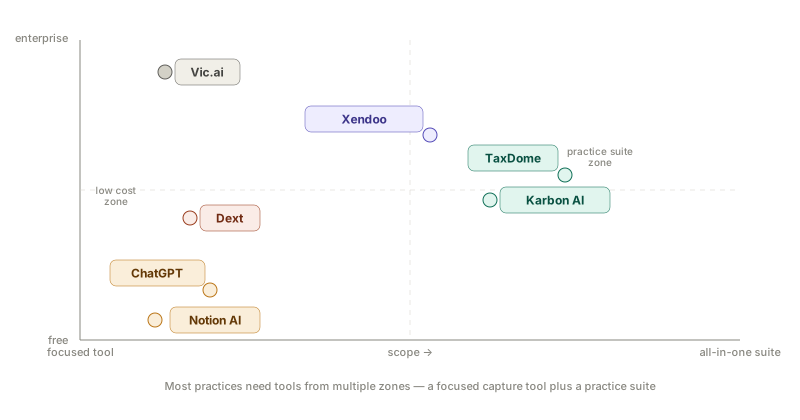
Side-by-Side Comparison
| Tool | Best for | Starting price | Free trial | Affiliate |
|---|---|---|---|---|
| Dext Prepare | Document capture, pre-accounting | ~$208/mo (10 clients) | ✓ 14 days | ✓ |
| TaxDome | All-in-one practice management | ~$800/user/year | ✓ 2 weeks | ✓ |
| Xendoo (Botkeeper AI) | Automated bookkeeping | $395/mo | ✓ 30-day guarantee | — |
| Vic.ai | AP automation, enterprise | Custom | ✗ | — |
| Karbon AI | Workflow & team management | $59/user/mo | ✓ | — |
| ChatGPT (Custom GPT) | General CPA workflows | $20/mo | ✓ Free tier | — |
| Notion AI | Notes, SOPs, free option | Free / $10/mo add-on | ✓ | — |
How We Tested These Tools
Every tool in this list was put through real accounting workflows — not demo environments. Testing covered:
Transaction categorisation — 500 mixed transactions across 3 client accounts, measuring coding accuracy and time to review exceptions.
Document capture — 200 documents including scanned receipts, emailed PDFs, and multi-page bank statements, measuring extraction accuracy and time to publish to QBO and Xero.
Client communication — Drafting engagement letters, responding to IRS notices, and generating client-ready P&L summaries.
Practice workflow — Creating recurring job templates, automating client reminders, and tracking work in progress across a simulated 8-client portfolio.
Tools that failed basic accuracy checks, required excessive manual cleanup, or had significant reliability issues reported in recent G2 and Capterra reviews were cut from the shortlist before testing.
1. Dext Prepare — Best for Document Capture
Dext Prepare (formerly Receipt Bank) is the most widely adopted document capture tool in the accounting profession, with a 4.8-star rating on the Xero App Store — the highest among its direct competitors. It does one job: get supplier documents into your accounting software with minimal manual intervention. For most CPA firms, that one job accounts for 3–5 hours of admin work per week per client.
Pricing
Dext Practice Plans start at $207.99 per month (annual billing) for 10 business clients — roughly $20.80 per client per month. Monthly billing starts at $239.19 for 10 clients. Business Plans for individual users start at $25.21 per month (annual) for 5 users with 250 documents.
The per-client model works well for practices with moderate-to-high document volumes per client. It becomes expensive for firms with many low-volume micro-clients.
What Works Well
Supplier rules are where Dext earns its price. Once configured for a recurring supplier — a client’s regular utility provider, software subscriptions, payroll processor — Dext auto-codes and auto-publishes those invoices to the correct GL account without review. On a portfolio of 5 clients each sending 40+ documents per month, well-configured supplier rules remove 2–3 hours of weekly review time.
Multiple submission methods remove the client compliance bottleneck. Clients submit via mobile app, email forwarding, WhatsApp, or Dropbox — whichever requires least effort from them. Based on user reviews, this flexibility is the single most cited reason practices switch to Dext from competitors.
Dext integrates directly with Xero, QuickBooks Online, Sage, and over 11,500 banks and third-party platforms. It advertises 99.9% data extraction accuracy.
What Does Not Work Well
Pricing has increased significantly and cancellation is harder than it should be. Multiple G2 and Capterra reviewers report that cancelling subscriptions is difficult and customer service response is slow. Verify exit terms before signing an annual contract.
Line item extraction is plan-gated. If your clients need purchase order matching or inventory reconciliation requiring line-level invoice detail, this feature is not available on the base plan.
Not an AP automation platform. Dext captures and codes documents — it does not manage approval workflows or execute payments. For clients needing full AP automation, Dext handles the capture layer; you need BILL or Stampli for the payment layer.
Dext Pros and Cons
Pros:
- 4.8-star Xero App Store rating — consistently reliable in production
- Supplier rules eliminate manual coding for recurring invoices
- Widest range of client submission methods in the market
- 14-day free trial — lowest evaluation risk
Cons:
- Per-client pricing penalises practices with many small-volume clients
- Cancellation complaints are a recurring pattern in user reviews
- Line item extraction requires higher plan tier
- Does not handle AP approvals or payment execution
Supplier rules auto-code recurring invoices before they hit your ledger — the fastest way to cut 2–3 hours of weekly document review across a multi-client practice.
2. TaxDome — Best for Practice Management
TaxDome consolidates CRM, workflow automation, client portal, billing, document storage, e-signatures, and team chat into a single subscription — replacing 3–5 separate tools for most practices. It is the most adopted all-in-one practice management platform in the US tax and accounting market, ranked #1 by SelectHub across 2025–2026 with a 96% user satisfaction rate.
Pricing
TaxDome’s Essentials plan starts at approximately $58 per user per month on a three-year commitment, or around $800 per user annually on a standard annual plan. The Pro plan (required for teams) adds custom approval workflows, integrations, and client portal features at higher per-seat pricing.
An important pricing caveat: TaxDome is billed upfront annually. For a 10-person firm on the Pro plan, this means a significant upfront commitment — installment plans are available for invoices exceeding $9,000. Firms that prefer true monthly flexibility should factor this into the decision.
What Works Well
All-in-one consolidation is genuine. Practices regularly report replacing their separate CRM, invoicing tool, document management system, and client communication platform with a single TaxDome subscription — and paying less in total. This is not marketing copy; it comes through consistently in user reviews.
Workflow automations are the core productivity driver. TaxDome’s pipeline system automates repetitive sequences: sending organiser requests, chasing outstanding documents, routing completed returns for review, generating engagement letters. Based on user reviews on G2 and Capterra, well-configured workflows are cited as saving 5–10 hours per week for practices processing seasonal tax volumes.
AI-powered reporting (Business plan) provides firm-level performance insights including turnaround times, bottlenecks, and year-over-year workload comparisons — the type of data that informs pricing and capacity decisions.
TaxDome integrates with QuickBooks Online, Drake Tax, UltraTax, Calendly, Gmail, and Zapier. The IRS transcript integration allows tax preparers to pull transcripts directly into client files.
What Does Not Work Well
Setup is significant. Multiple reviewers note that TaxDome requires months of configuration before it pays back the investment. Templates, workflows, and automations are highly customisable — but someone on your team has to build them. Firms expecting an out-of-the-box experience are frequently disappointed in the first 60 days.
Stripe-only for payments. TaxDome forces payment processing through Stripe; you cannot use an alternative processor within the platform. For firms with existing payment infrastructure, this is a friction point.
PDF editor is limited. TaxDome’s built-in PDF tooling is functional but does not replace Adobe Acrobat for complex annotation needs. Most reviewers keep an Adobe subscription alongside TaxDome.
TaxDome Pros and Cons
Pros:
- Replaces 3–5 separate tools — genuine consolidation savings
- Workflow automations reduce manual follow-up by 5–10 hrs/week once configured
- Unlimited client accounts on all plans — pricing does not scale with client count
- #1-ranked accounting practice management software (SelectHub 2026)
- IRS transcript integration for US tax firms
Cons:
- Annual upfront billing required — significant cash commitment
- 2–3 months of setup before full ROI
- Stripe-only for invoicing and payments
- PDF editing requires Adobe subscription alongside TaxDome
Consolidates CRM, billing, client portal, workflows, and e-signatures into one subscription — most practices eliminate 3–4 separate tools and pay less overall.
3. Xendoo (with Botkeeper Infinite) — Best for Automated Bookkeeping
Xendoo acquired Botkeeper Infinite — the AI bookkeeping automation engine built by Botkeeper — in March 2026. For CPA firms that were using Botkeeper Infinite’s transaction coding, reconciliation automation, and client management workflows, Xendoo now operates that platform under new ownership and has committed to continued development, with Botkeeper’s founder indicating a significant upgrade before the end of 2026.
For firms evaluating Xendoo independently of the Botkeeper history: it is a profitable, tech-forward bookkeeping service that had grown at double-digit rates year-over-year before the acquisition, which is meaningful vendor stability in a market where platform shutdowns are now demonstrably real.
Pricing
Xendoo’s standard plans are expense-volume based: Essentials at $395 per month (weekly bookkeeping, monthly financials, bank and credit card reconciliation), Growth at $695 per month (adds tax consultant access and modified accrual accounting), and Scale at $995 per month. A 30-day money-back guarantee applies on all plans.
Botkeeper Infinite pricing under Xendoo’s ownership has not been fully publicly confirmed as of April 2026. Firms using Infinite should contact Xendoo directly to verify ongoing contract terms.
What Works Well
Weekly reconciliation cadence is Xendoo’s standout operational advantage over monthly-close competitors. Clients receive reconciled books every week, not at month-end, which means cash flow visibility is current rather than 30 days behind.
Botkeeper Infinite’s transaction coding — now part of the Xendoo portfolio — was trained to autonomously categorise 80%+ of transactions with 98% accuracy. For CPA firms managing high-transaction-volume clients, this automation layer is the meaningful differentiator over standard cloud bookkeeping services.
Xendoo supports both QuickBooks Online and Xero, and its Q2X platform was selected as Xero’s preferred migration partner for businesses moving from QuickBooks Desktop to Xero.
What Does Not Work Well
Botkeeper Infinite’s long-term roadmap is still being defined. The acquisition is recent; Xendoo is still integrating the platform and its team. Firms building workflows around Infinite-specific features should verify support commitments directly before signing.
US-centric. Xendoo’s core market is US-based small businesses. UK and Canadian practices should evaluate regional alternatives alongside Xendoo before committing.
Tax service charges have surprised some clients. Reviews on Google and the BBB note unexpected charges for tax return preparation. Get a full cost breakdown in writing before adding tax services to your plan.
Xendoo Pros and Cons
Pros:
- Weekly reconciliation — books are always current, not 30 days stale
- Botkeeper Infinite’s AI coding engine now under a profitable, stable owner
- Supports both QuickBooks Online and Xero
- 30-day money-back guarantee — lowest evaluation commitment of any bookkeeping service
- Xero’s preferred QuickBooks Desktop migration partner
Cons:
- Botkeeper Infinite roadmap under new ownership still being defined
- US-centric — limited utility for UK and Canadian practices
- Tax service add-on costs should be confirmed in writing upfront
The most direct replacement for Botkeeper — weekly reconciliation cadence with Botkeeper Infinite's AI coding engine now operating under a profitable, growing owner.
4. Vic.ai — Best for AP Automation
Vic.ai is built for one specific workflow — accounts payable automation — and it does that workflow at a level no other tool in this list can match. Its AI is trained on over one billion invoices and delivers 85% no-touch processing within six months, with invoices coded, routed for approval, and queued for payment without human review.
This tool is not for most practices in this list’s target audience. It is for CPA firms managing AP for clients processing 500+ invoices per month with complex ERP environments. If that describes your workload, nothing else comes close.
Pricing
Vic.ai uses custom enterprise pricing based on invoice volume and ERP configuration. Published data suggests it reduces per-invoice processing cost from approximately $12 to under $2 at scale — but the subscription cost itself is not publicly disclosed. Budget for an enterprise-tier investment and a 3–6 month implementation timeline.
What Works Well
Autonomous GL coding is the genuine differentiator. Vic.ai’s AI does not suggest codes for human review — it makes coding decisions autonomously based on historical patterns and invoice content, correcting itself over time. At 85%+ straight-through processing, the AP team’s role shifts from coder to exception handler.
ERP integration depth covers SAP, Oracle, NetSuite, and major enterprise platforms natively. For clients on these systems, Vic.ai integrates directly into the existing workflow rather than creating a parallel system.
Based on a published case study, one transportation company achieved 99% invoice coding accuracy and an 84% no-touch processing rate, reallocating three full-time equivalent staff to higher-value work.
What Does Not Work Well
No free trial and enterprise-only pricing make Vic.ai inaccessible for evaluation without a sales commitment. Small and mid-sized practices will find the cost disproportionate to benefit.
Not an all-accounts tool. Vic.ai is AP-only. It does not handle bookkeeping, expense management, or practice management. It is a specialist layer on top of an ERP, not a standalone accounting platform.
Vic.ai Pros and Cons
Pros:
- 85%+ no-touch processing — genuine autonomy, not just automation
- Trained on 1 billion+ invoices — deepest AP-specific AI model available
- Native SAP, Oracle, NetSuite integrations
- Reduces invoice processing cost from ~$12 to under $2 per invoice at scale
Cons:
- Enterprise pricing, no public rate card
- No free trial
- AP-only — requires separate platforms for all other accounting functions
- 3–6 month implementation timeline
The only tool in this list that genuinely automates AP coding decisions rather than just suggesting them — viable only for practices managing 500+ invoices per month on SAP, Oracle or NetSuite.
5. Karbon AI — Best for Workflow and Team Management
Karbon is the #1-ranked accounting practice management platform on G2, and its AI features — currently in open beta and included at no additional cost — add email prioritisation, thread summarisation, draft generation, and workflow analytics on top of an already best-in-class practice management foundation.
The key distinction from TaxDome: Karbon is built around team workflow and communication first. If your primary bottleneck is internal: work visibility, deadline tracking, email management across a distributed team — Karbon is the stronger fit. If your bottleneck is external: client portal, billing, document collection — TaxDome is likely the better choice.
Pricing
Karbon pricing starts at $59 per user per month for the Team plan, with Business and Enterprise tiers above that. Karbon AI features are currently included in all plans during open beta. A paid pricing tier for AI will be introduced in future — communicate with Karbon about timeline before signing if AI is a primary purchase driver.
What Works Well
Email triage and thread summarisation are the most immediately useful AI features. Karbon AI assesses incoming emails for urgency and sentiment, surfaces which ones need attention first, and can summarise long client threads in one click. For partners managing hundreds of open communications, this reduces cognitive load materially.
Workflow automation is Karbon’s core capability, predating the AI features. Recurring job templates, automated client request sequences, and smart reminders for outstanding items are mature, production-grade features used by 30,000+ accounting professionals across 34 countries.
Karbon AI Agents — launching in early 2026 — handle repetitive tasks like data entry, client follow-ups, and onboarding sequences autonomously, keeping processes moving without human initiation.
What Does Not Work Well
Steep setup curve. Configuring templates, workflows, and automations to match your firm’s specific processes requires precision and time. Reviewers consistently note that the first 30–60 days require significant investment before the platform pays back.
QBO integration is limited. Multiple reviewers explicitly note that while a QBO integration exists, it does not mesh well with Karbon’s CRM structure. Firms expecting deep accounting software integration should test this specifically.
AI pricing not yet disclosed. Karbon AI is free during beta but will carry an additional charge in future. If AI capabilities drive the purchase decision, get clarity on future pricing in writing before committing to an annual contract.
Karbon Pros and Cons
Pros:
- #1-ranked accounting practice management on G2 — deep user validation
- AI email prioritisation and summarisation reduce partner communication overhead
- Mature workflow automation with 30,000+ users in production
- AI Agents (2026) handle repetitive follow-up tasks autonomously
- Powered by Azure OpenAI — enterprise-grade security and compliance
Cons:
- Steep initial setup — 30–60 days before full workflow ROI
- QBO integration has known limitations — test before committing
- AI pricing not yet disclosed — future cost is unknown
- Higher per-user cost than TaxDome at team scale
The strongest practice management platform for teams that need deep workflow visibility and AI-assisted email management — especially for firms with 5+ staff and complex recurring job structures.
6. ChatGPT (Custom GPT) — Best for General CPA Workflows
ChatGPT is the most versatile tool on this list and the lowest-cost entry point for AI-augmented CPA work. A well-configured Custom GPT with accounting-specific instructions handles client emails, memo drafting, IRS notice responses, research queries, and summary report generation — all without switching platforms.
The ceiling is lower than any other tool in this list. ChatGPT does not connect to your accounting software, cannot execute workflows, and should never be used with raw client data unless you have enabled enterprise privacy settings and verified the data processing agreement. Within those constraints, it delivers substantial time savings at $20 per month.
Pricing
ChatGPT Plus costs $20 per user per month and includes GPT-4o with Custom GPT creation. For CPA firms building a shared Custom GPT, a single Plus subscription used by one team member to manage the configuration is often sufficient, with outputs shared via normal communication channels.
What Works Well
Custom GPT system prompts are the configuration that makes ChatGPT useful for CPA work rather than generic. A well-crafted system prompt covering professional tone, US GAAP and IRC reference conventions, client communication standards, and confidentiality reminders produces outputs that require far less editing than a generic ChatGPT session.
Common high-value use cases based on CPA community reports: drafting client-facing P&L summaries in plain language, generating first drafts of engagement letters, explaining complex tax provisions in client-ready language, researching regulatory changes, and drafting responses to standard IRS CP notices.
Lowest cost of any AI capability improvement — $20 per month is accessible to solo practitioners with one client.
What Does Not Work Well
No accounting software integration. ChatGPT cannot connect to QBO, Xero, or your practice management system. It works on text inputs only — you describe the situation, it generates a response. It does not pull data, run calculations on live financials, or generate reports from your actual figures.
Hallucination risk on specific tax and regulatory questions. General AI models are trained on broad data and will occasionally generate plausible-sounding but incorrect citations to IRS codes, GAAP standards, or case law. Every output that references specific regulatory provisions must be verified independently before sending to a client or regulator.
Data security requires discipline. Do not paste client PII, financial statements, or tax data into the standard ChatGPT interface. Use only general patterns and anonymised scenarios unless you have verified enterprise data handling.
ChatGPT Pros and Cons
Pros:
- $20 per month — lowest cost AI capability available
- Custom GPT system prompts produce CPA-grade output with minimal editing
- Free tier available for basic use
- Handles client communication, research, and drafting across any accounting scenario
Cons:
- No accounting software integration — text-only input
- Hallucination risk on specific regulatory citations — always verify
- Client data should not be entered without enterprise privacy agreement
- No workflow automation, no practice management features
A well-configured Custom GPT with CPA-specific instructions handles client emails, memo drafts, and IRS notice responses at $20 per month — the highest-ROI entry point for solo practitioners.
7. Notion AI — Best Free Option
Notion with AI enabled is the lowest-cost way to implement AI-assisted documentation, client notes, and SOP management for a CPA practice. The ceiling is genuinely low — Notion does not handle transactions, automate workflows, or connect to accounting software. But for practitioners who need to organise their knowledge base, standardise procedures, and summarise meeting notes without adding a monthly subscription, it delivers surprising value at zero marginal cost.
Pricing
Notion’s free plan includes core features for individuals. The AI add-on costs $10 per member per month, or is included in Notion’s Plus and Business plans. For a solo practitioner, the total cost can be as low as $10–16 per month depending on plan.
What Works Well
Meeting and client call summarisation is the most immediately useful AI feature for accountants. After a client onboarding call or year-end review, Notion AI condenses notes into structured summaries with action items extracted automatically — a task that otherwise takes 15–20 minutes of manual formatting.
SOP documentation benefits from AI-assisted drafting. Describing a workflow in plain language and asking Notion AI to structure it as a numbered procedure with checkboxes produces usable first drafts of practice standards, client onboarding templates, and tax preparation checklists.
Zero cost for basic use makes this accessible to practices in their first year or those with strict software budgets.
What Does Not Work Well
Notion is not accounting software. There are no integrations with QBO, Xero, or any accounting platform. Financial data lives elsewhere; Notion handles the surrounding knowledge work only.
AI quality is general-purpose. Notion AI is powered by general language models and does not carry specific accounting or tax knowledge. Its outputs are structurally useful but require the same regulatory fact-checking discipline as any general AI tool.
Notion AI Pros and Cons
Pros:
- Free to start — zero marginal cost for basic AI features
- Meeting summarisation and SOP drafting save 15–30 minutes per use
- No learning curve — familiar document interface
- Flexible for custom knowledge bases, templates, and procedure docs
Cons:
- No accounting software integration
- AI is general-purpose — not accounting-specific
- Low ceiling: handles documentation, not accounting workflows
- Not a practice management or workflow automation tool
Meeting summaries and SOP drafting at near-zero cost — the only tool on this list that solo practitioners can add today with no budget approval required.
Which Tool Fits Which Firm?
Solo practitioners (1 person, 5–15 clients): Start with ChatGPT Plus ($20/mo) for communication and research, and Dext Prepare for document capture. Combined cost under $230/month. Time saved: 3–6 hours per week.
Small practices (2–5 staff, 15–40 clients): Dext Prepare + TaxDome covers pre-accounting automation, practice management, client portal, and billing in two subscriptions. This combination replaces a typical 4–6 tool stack at lower total cost.
Growing practices (5–15 staff, 40–100 clients): Karbon AI for team workflow and practice intelligence, Dext for document capture, and TaxDome for client-facing operations. If bookkeeping automation at scale is a priority, add Xendoo for the highest-volume clients.
Firms managing high-volume AP for enterprise clients: Vic.ai is the only tool that delivers genuine AP autonomy at 500+ invoices per month. For practices not operating at that scale, BILL or Stampli deliver 70–80% of the value at a fraction of the cost — see our Vic.ai Alternatives comparison for a detailed breakdown.
A Note on Data Security
Every tool in this list handles sensitive financial data. Before deploying any AI tool across client accounts, verify three things: the vendor holds SOC 2 Type II certification; you have reviewed and accepted the data processing agreement; and your engagement letters with clients reference the tools you use on their behalf.
For general AI tools like ChatGPT and Notion AI specifically: do not enter client tax identification numbers, account numbers, Social Security numbers, or identifiable financial figures unless you have enabled and verified enterprise-grade data isolation. The free or standard consumer tiers of these tools are not appropriate for client data without explicit verification of their data handling policies.
This is not financial or legal advice. Prices and features are subject to change — verify directly with each vendor before purchasing. Botkeeper Infinite’s pricing under Xendoo ownership should be confirmed directly with Xendoo.
Last reviewed: March 2026. Spotted outdated information? Write to info@kynledger.com.