

TaxDome Review 2026: Is It Worth $800/Year for Your CPA Firm?
The promise TaxDome makes is specific and verifiable: replace your separate CRM, document management system, client portal, e-signature tool, invoicing software, and workflow tracker with one subscription. For most small-to-mid-sized accounting practices, that consolidation claim is the entire sales case.
Whether it holds up depends on whether you build it correctly. That is the catch most reviews understate — TaxDome is genuinely powerful, but it is also a platform you have to configure before it works. I have set up TaxDome for practices ranging from solo practitioners to 8-person firms, and the difference between a TaxDome installation that saves 8 hours per week and one that sits underused is almost always the quality of the initial pipeline build.
This review covers what TaxDome does well, where it falls short compared to alternatives, and how to evaluate whether it is the right fit for your practice right now.
Quick Verdict
TaxDome is the best all-in-one practice management platform for tax and accounting firms with 2–15 staff, a significant client portal and document collection requirement, and the bandwidth to invest 6–8 weeks in proper configuration. It is the #1-ranked accounting practice management platform on SelectHub and winner of the 2024 CPA Practice Advisor Readers’ Choice Award. The upfront annual billing requirement and Stripe-only payment processing are real friction points. For firms whose primary bottleneck is internal team workflow rather than client-facing compliance, Karbon is a stronger fit.
What TaxDome Is
TaxDome is a practice management platform built specifically for tax preparers, CPAs, bookkeepers, and EAs. It brings together client management, workflow automation, secure document storage, client portal, e-signatures, invoicing, payments, and team collaboration in one subscription. The company was founded in 2017 and now serves over 10,000 firms managing more than 3 million client accounts.
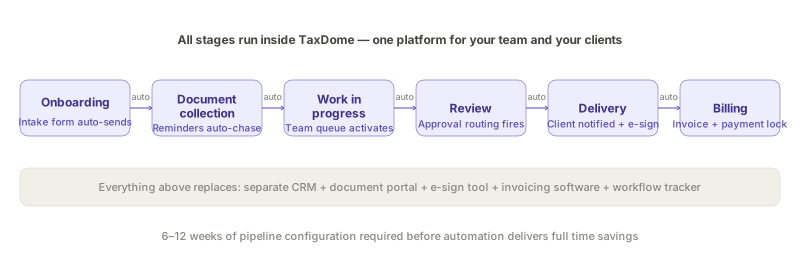
The platform’s architecture centres on two concepts: the pipeline and the client portal. Pipelines are visual, stage-based workflow representations of each service your firm offers — tax return preparation, bookkeeping monthly close, client onboarding, payroll processing. As a job moves through pipeline stages, pre-configured automations trigger: document requests go out automatically, reminder sequences run without manual intervention, engagement letters generate, invoices are created. The client portal is where clients interact — uploading documents, signing forms, paying invoices, messaging your team — through a white-labelled interface with your firm’s branding.
When both are configured well, TaxDome becomes the single interface your team uses for all client work and the single interface your clients use to interact with your firm. That is the consolidation value proposition made real.
Pricing
TaxDome operates on a per-user, per-year subscription model with three tiers: Essentials (single user only), Pro (any team size), and Business (enterprise features).
The Essentials plan starts at approximately $58 per user per month on a three-year commitment — roughly $700 per user per year. Pro adds team collaboration, custom approval workflows, direct integrations, and expanded features at higher per-seat pricing. Business adds a dedicated Customer Success Manager, bi-annual business reviews, unlimited team chat history, and the enterprise QuickBooks integration.
The critical pricing reality: all plans require upfront annual payment. For a 5-person team on the Pro plan, this means approximately $4,000–6,000 upfront. For a 10-person team, $8,000–12,000. Installment plans are available when the invoice exceeds $9,000, but the default is full annual payment.
Multiple user reviews on Capterra and G2 note that TaxDome has increased prices despite earlier representations that pricing would be locked in. This is a legitimate concern for practices that signed up at lower historical rates and experienced unannounced increases at renewal. Verify the contract terms specifically around price escalation before signing.
What Works Well
Pipeline automation is the core time-saving capability
TaxDome’s pipeline system is the feature that separates it from simpler document portals. Once a pipeline is correctly built for, say, individual tax return preparation, the workflow runs as follows: client is added to the pipeline → automated intake questionnaire sends → document request triggers → reminder sequences run until documents are received → return preparation stage activates your team’s work queue → review routing fires → client delivery notification sends → invoice releases on completion. Your team manages exceptions; the routine coordination happens automatically.
In practice, for a well-configured pipeline across 40 active tax clients, this automation eliminates the manual follow-up emails that previously consumed 2–3 hours per week per staff member during tax season. The impact compounds with client volume — the more clients you have, the more the automation saves relative to the cost.
TaxDome’s pre-built pipeline templates in the marketplace cover the most common accounting scenarios, which reduces the initial build time significantly. For practices offering a standard set of services — individual returns, business returns, monthly bookkeeping, payroll — the templates provide a functional starting point that you customise to your process rather than building from scratch.
Client portal adoption is consistently strong
The TaxDome client mobile app has a 4.9/5 rating across 6,000+ App Store ratings and consistently ranks in the top 100 of the iOS Finance category. That is not a marketing number — it reflects a genuine product investment in the client-facing experience. When clients find the portal easy to use, they actually upload documents on time, sign forms promptly, and pay invoices through the portal rather than requiring manual chasing.
For practices that have struggled with client compliance — the January document scramble, the repeated phone calls chasing outstanding forms — a client portal with high adoption rates is a material operational improvement. TaxDome’s portal is the best in the practice management category on this metric.
Document management and unlimited storage
TaxDome includes unlimited cloud storage with encrypted document management, folder templates that auto-apply per client type, and the ability to collect, store, and deliver documents within the same platform where clients sign engagement letters and pay invoices. Eliminating the separate document portal subscription — SafeSend, ShareFile, Dropbox, or equivalent — is a meaningful cost saving for practices currently paying separately for file sharing.
The payment locking feature is worth highlighting specifically: it restricts client access to completed tax returns until the associated invoice is paid. For practices that have struggled with the sequence of “deliver return, wait for payment,” this feature resolves the issue structurally rather than through collections follow-up.
IRS transcript integration
TaxDome’s IRS integration allows tax preparers to pull transcripts directly into client files — account transcripts, return transcripts, wage and income transcripts — without leaving the platform. For US tax firms handling resolution work or multi-year filings, this eliminates a manual process and reduces the risk of transcript retrieval errors.
The AI-powered workpapers feature (launched 2025) automatically organises incoming client documents into the correct workpaper categories, reducing the manual sorting that previously started every tax return preparation workflow.
What Does Not Work Well
Setup investment is real and frequently underestimated
Every honest review of TaxDome includes this caveat: the platform requires 6–12 weeks of configuration before it delivers on its promise. Building pipelines, configuring templates, setting up document folder structures, migrating client data, training your team, and onboarding clients to the new portal — all of this happens before the automation savings begin to materialise.
The failure mode I see most often in practices that have bought TaxDome and are disappointed: they used the 14-day trial, got the account set up at a basic level, and signed the annual contract expecting the efficiency gains to arrive immediately. They did not, because the pipelines were not built. Six months later the team is still using TaxDome as a document portal and manually tracking workflows in a spreadsheet alongside it.
TaxDome’s onboarding resources — video tutorials, implementation guides, customer success sessions — are good and improving. But they do not change the fundamental reality that proper configuration requires a dedicated investment of time from someone in your firm who understands your workflows well enough to build them correctly.
Stripe-only payment processing
TaxDome removed CPACharge as a payment processing option without advance notice, forcing all payment processing through Stripe. This is the most consistently negative theme in recent user reviews across multiple platforms. Firms that had built client-facing communications and billing expectations around CPACharge had to migrate with minimal warning.
The practical issue is not Stripe specifically — Stripe is a reliable, well-documented payment processor. The issue is the removal of choice and the manner of the change. For practices evaluating TaxDome now, verify the current payment processing options and understand that integration partnerships can change without the contract protections you might assume.
PDF editing requires Adobe Acrobat alongside TaxDome
TaxDome’s built-in PDF editor handles basic annotation, rotation, and form completion. It does not replace Adobe Acrobat for complex tax return annotation, multi-page PDF manipulation, or the kind of document preparation that tax firms do as a matter of routine. Multiple reviewers note that they maintain an Adobe subscription alongside TaxDome despite having expected to consolidate.
If your firm’s workflow involves significant PDF work — annotated workpapers, complex return assembly, redlined engagement letters — TaxDome does not eliminate that cost. Factor the Adobe subscription into your TCO calculation.
No public API, limited Zapier reach
TaxDome connects to QuickBooks Online, Gmail, Calendly, Stripe, and a handful of scheduling tools. Third-party integration beyond this requires Zapier. The absence of a public API limits the depth of custom integrations and means that as TaxDome evolves, integration maintenance falls on Zapier connectors rather than direct platform connections.
For practices with specialist tools — a CRM outside TaxDome’s native functionality, a custom reporting stack, or industry-specific software — the integration ceiling is a real constraint.
Pros and Cons
Pros:
- Genuinely consolidates CRM, portal, e-signatures, billing, and workflow in one subscription
- Pipeline automation eliminates 5–10 hours of weekly manual follow-up once configured
- Client portal 4.9/5 App Store rating — clients actually use it
- Unlimited client accounts on all plans — cost does not scale with client count
- IRS transcript integration for US tax firms
- #1-ranked accounting practice management platform (SelectHub 2026)
- Payment locking feature resolves the deliver-then-collect billing sequence problem
Cons:
- Upfront annual billing required — significant cash commitment; price increases have been reported
- 6–12 weeks of configuration before full efficiency gains materialise
- Stripe-only payment processing — CPACharge removed without adequate notice
- PDF editing requires Adobe Acrobat alongside TaxDome
- No public API — third-party integrations require Zapier
- Not the right choice if internal team workflow and email management is the primary bottleneck (Karbon is better for that use case)
TaxDome vs Karbon: The Direct Comparison
Both TaxDome and Karbon are practice management platforms aimed at accounting firms. The choice between them comes down to where your bottleneck lives.
Choose TaxDome if: Your primary friction is client-side — getting clients to submit documents on time, signing engagement letters, paying invoices before you release returns, and keeping client communication organised in one place. TaxDome’s client portal, document management, and pipeline automation are purpose-built for this problem.
Choose Karbon if: Your primary friction is internal — email overload across a distributed team, unclear task ownership, no visibility into who is doing what on which client, and poor handoff between team members. Karbon’s email integration, AI triage, and workflow collaboration features are better than TaxDome’s for internal team management. Karbon AI also adds email summarisation and prioritisation that TaxDome does not currently offer.
The two platforms are not mutually exclusive in principle, but in practice most firms choose one as their primary system and live with its trade-offs rather than paying for both.
Who Should Buy TaxDome
Best fit: Tax and accounting firms with 2–15 staff, a client base heavy in individual and small business tax preparation, and a significant document collection and signature workflow. Firms willing to invest 6–8 weeks in proper configuration. Annual budget for practice management software of $2,000–$12,000 per year.
Not the right fit: Firms whose primary workflow bottleneck is internal team management and email visibility (use Karbon). Firms with fewer than 10 active clients where the ROI timeline extends beyond 12 months. Firms with complex third-party integration requirements that exceed TaxDome’s Zapier-based integration model. UK firms: TaxDome is US-centric and lacks the MTD integration, UK GDPR compliance certifications, and HMRC-specific features that UK practices require — use Xero or FreeAgent-based stacks instead.
Bottom Line
TaxDome is the most capable all-in-one practice management platform for US CPA and tax firms in its price range. The consolidation value is real — practices that configure it properly consistently report replacing 3–5 separate subscriptions and reducing administrative overhead materially.
The qualifications matter: “configure it properly” requires 6–12 weeks of dedicated work before the efficiency gains materialise, the upfront annual billing is a cash commitment that smaller firms find constraining, and the Stripe-only payment processing change is a legitimate commercial risk to factor in.
For a 3–12 person US tax and accounting firm with the bandwidth to invest in proper implementation, TaxDome earns its price. For a firm expecting out-of-the-box time savings or operating on a monthly cash basis, the fit is weaker than the marketing suggests.
The best all-in-one platform for US tax and CPA firms that can invest 6–8 weeks in proper pipeline configuration — consolidates CRM, portal, workflows, e-signatures, and billing into one subscription with unlimited client accounts.
Pricing verified against multiple sources as of April 2026. TaxDome pricing changes annually — verify current rates at taxdome.com/pricing before purchase. This review focuses on the US market; TaxDome’s UK and international features are limited compared to dedicated UK platforms.
This is not financial or legal advice. Last reviewed: April 2026.