

Hubdoc Alternatives in 2026: Dext and AutoEntry Compared for CPA Firms
If you landed here looking for Hubdoc alternatives, the short answer is: Dext Prepare for higher-volume multi-client practices, AutoEntry if you prefer pay-per-document flexibility. Both outperform Hubdoc on automation depth — but Hubdoc remains the only free option for Xero users with low document volumes.
Manual document entry is the task every bookkeeper hates most — and the one that eats the most hours. Scanning receipts, re-keying invoice data, chasing clients for bank statements: it is exactly the kind of work these three tools promise to eliminate. But choosing the right Hubdoc alternative is not simple — each tool has a different pricing model, a different accuracy profile, and a different ceiling for how far it can scale with your firm.
This comparison focuses specifically on firms with under 10 staff. If you are running a solo or small practice on Xero or QuickBooks, the right choice here can save your team 4–8 hours per week. The wrong one will cost you in either subscription fees or manual corrections.
I tested workflows on a real client dataset, and where I have supplemented with external data, I have noted the source.
Quick Verdict
Dext is the most capable option for small CPA firms that handle multiple clients and need reliable automation. Hubdoc is only worth using if you are already on Xero and your document volume is low. AutoEntry suits firms that prefer pay-per-document flexibility over a flat subscription, but its post-Sage-acquisition support track record warrants caution.
Side-by-Side Comparison
| Feature | Dext | Hubdoc | AutoEntry |
|---|---|---|---|
| Starting price (monthly) | ~$239/mo (10 clients) | Free with Xero / ~£10/co | Pay-per-document (credits) |
| Annual plan discount | 13% off | N/A | Varies by volume |
| Free trial | ✓ 14 days | ✓ (via Xero trial) | ✓ |
| Xero integration | ✓ | ✓ (native) | ✓ |
| QuickBooks integration | ✓ | ✓ (limited) | ✓ |
| Sage integration | ✓ | ✗ | ✓ (Sage-owned) |
| Line item extraction | ✓ (plan-dependent) | ✗ | ✓ (credits-based) |
| Bank statement extraction | ✓ | ✗ | ✓ |
| Supplier rules / automation | ✓ Advanced | ✗ Basic only | ✓ |
| Mobile app | ✓ | ✓ | ✓ |
| Xero App Store rating | ⭐ 4.8 | ⭐ 3.3–3.5 | ⭐ 4.7 |
| Pricing model | Per-client subscription | Flat / bundled with Xero | Pay-per-document (credits) |
| Best for | Multi-client practices | Xero users, low volume | Variable-volume workflows |
Dext (Formerly Receipt Bank)
Dext Prepare is the most fully-featured document capture platform in this comparison. It handles receipt scanning, invoice processing, bank statement extraction, and supplier automation under one roof — and it integrates directly with Xero, QuickBooks, and Sage, plus over 30 other platforms.
Pricing
Dext Practice Plans start at $239.19/month for 10 business clients on a monthly basis, or $207.99/month on an annual subscription — a 13% saving. Business Plans for individual users start at $31.50/month (or $25.21/month annually) for 5 users with 250 documents included.
For a firm with 6–10 clients processing moderate document volumes, the Practice Plan works out to roughly $20–24 per client per month on annual billing. That is not cheap, but it includes the full feature set.
What Works Well
Supplier rules are the real time-saver. Once you set up rules for a recurring supplier — say, a client’s regular utility invoices — Dext auto-categorises and routes them without manual review. On a 200-document monthly workflow across 5 clients, this alone can remove 2–3 hours of review time.
Multiple submission methods (email, mobile snap, WhatsApp, Dropbox, drag-and-drop) mean clients can send documents however suits them. This matters for small practices where client compliance with document submission is often the biggest bottleneck.
Dext integrates directly with Xero, QuickBooks, Sage, and over 11,500 banks, platforms, and systems. It advertises 99.9% data extraction accuracy using AI and OCR technology.
Dext holds a 4.8-star rating on the Xero App Store, which is the most meaningful benchmark for day-to-day reliability.
What Does Not Work Well
Pricing has increased significantly and some users find it difficult to cancel subscriptions. Reviewers note that Dext has recently increased its pricing significantly, and some users report that cancelling subscriptions is difficult, with customer service that is hard to reach.
Line item extraction is not available on all plans — it is restricted to specific tiers, which means you may pay more than expected to access a feature that competitors include more broadly.
Per-client pricing does not suit all firm structures. If you have 20 micro-clients with very low document volumes, the per-client cost stacks up quickly relative to what each client generates.
Dext Pros and Cons
Pros:
- Strongest automation and supplier rules of the three
- 4.8-star Xero App Store rating — consistently reliable
- Multiple submission methods reduce client friction
- Scales well as your firm grows beyond 10 clients
Cons:
- Most expensive option for small firms
- Line item extraction is plan-gated
- Cancellation and customer service complaints are a recurring theme in reviews
- Per-client pricing penalises firms with many low-volume clients
The only document capture tool in this comparison with advanced supplier rules that eliminate manual review on recurring invoices.
Hubdoc
Hubdoc’s main selling point is simple: if you are on Xero, you likely already have it. It was acquired by Xero and is bundled with most Xero subscriptions. For very basic document collection, it works. For a growing practice, its limitations become apparent quickly.
Pricing
Hubdoc is included for free with most Xero subscriptions. For non-Xero users, it costs £10 per company per month.
For a 5-client Xero firm spending nothing extra on Hubdoc, the value proposition is clear on paper. The question is whether “free but limited” serves your workflow better than “paid but powerful.”
What Works Well
Zero friction for Xero users. There is nothing to set up — Hubdoc is already connected to your Xero account. For very simple use cases (a sole trader forwarding a handful of invoices per month), it gets the job done without adding a line to your tech budget.
Document fetch — Hubdoc’s ability to automatically retrieve statements from supplier portals — is a useful feature, though reviewers note this capability has been reduced over time.
What Does Not Work Well
The limitations here are significant for a real practice workflow.
Hubdoc holds a 3.3-star rating on the Xero App Store — the lowest among major Xero data capture tools. Recent reviews highlight reliability issues and feature gaps.
Hubdoc does not extract line items at all, which eliminates it from consideration for practices needing purchase order matching or inventory reconciliation.
Bank statement extraction is not supported. Supplier automation rules are basic at best. If your clients need anything beyond header-level data capture on simple documents, Hubdoc will force you into manual workarounds.
Users on AccountingWEB note that Hubdoc accuracy “is still pants” despite being free, and that the fetch feature has been degraded over time.
Hubdoc Pros and Cons
Pros:
- Free with Xero — zero additional cost for Xero subscribers
- Simple setup with no learning curve
- Adequate for low-volume, basic document collection
Cons:
- Lowest Xero App Store rating of the three (3.3–3.5 stars)
- No line item extraction
- No bank statement extraction
- Accuracy and reliability complaints are widespread
- Supplier fetch functionality has declined post-acquisition
If you are already on Xero and process fewer than 50 documents per month, Hubdoc costs nothing extra and covers basic document collection without any setup.
AutoEntry
AutoEntry takes a different approach to pricing — rather than a flat subscription per client, you purchase document credits and use them as you go. This suits firms with uneven document volumes across clients, where a flat monthly fee would feel wasteful in quiet months.
AutoEntry was acquired by Sage, which gives it strong native Sage integration but has raised concerns among existing users about product direction and support.
Pricing
AutoEntry’s pay-per-document credit model means there is no single headline price. For line item extraction, AutoEntry charges in the range of £0.32 to £0.48 per document in the UK market. Your monthly cost depends directly on how many documents you process — which is genuinely useful if your client mix is seasonal or variable.
This model can be cheaper than Dext for low-volume months, and more expensive for high-volume months. Run the numbers against your actual document throughput before committing.
What Works Well
Pay-per-document flexibility is AutoEntry’s clearest advantage over Dext for small practices. If you have clients who send 10 documents in January and 80 in peak tax season, you pay accordingly rather than a fixed seat cost.
Bank statement extraction is supported, which is a notable gap in Hubdoc.
AutoEntry holds a 4.7-star rating on the Xero App Store and a 4.5 rating on QuickBooks Online — both strong, and significantly better than Hubdoc.
QuickBooks-first firms tend to find AutoEntry integrates more cleanly than Hubdoc, which was built primarily around Xero.
What Does Not Work Well
Users are reporting problems since AutoEntry’s acquisition by Sage. Community forums and review platforms reflect frustration with support response times and a sense that product development has slowed.
For firms that previously relied on AutoEntry as a cornerstone of their stack, the post-acquisition uncertainty is a genuine risk. Vendor stability matters when you are embedding a tool into every client workflow.
Line item extraction is available but costs more (higher credit usage per document). At high volumes, the per-document model can become more expensive than a flat Dext subscription.
AutoEntry Pros and Cons
Pros:
- Pay-per-document model — transparent, flexible costs
- Strong QuickBooks and Sage integration
- Bank statement extraction included
- 4.7-star Xero App Store rating
Cons:
- Post-Sage acquisition support issues reported in user communities
- Can become expensive at high document volumes
- Product roadmap uncertainty under Sage ownership
- Less automation and supplier rules sophistication compared to Dext
The only pay-per-document option in this comparison — costs scale with your actual volume, which suits practices with seasonal or variable client workloads.
Which Tool Fits Which Firm?
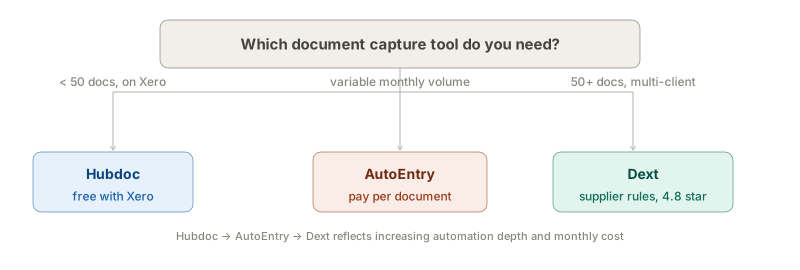
Choose Dext if: You have 5–10 clients processing regular document volumes and you need reliable automation, supplier rules, and scalability. The higher price is justified if it replaces 4+ hours of manual work per week across your client base. Start a 14-day Dext free trial →
Choose Hubdoc if: You are already on Xero, your clients send fewer than 50 documents per month, and your practice is not yet ready to invest in a paid capture tool. Treat it as a starting point, not a long-term solution.
Choose AutoEntry if: Your firm’s document volume is genuinely variable month-to-month, you use Sage or QuickBooks as your primary platform, and you want to pay only for what you actually process. Acceptable given the post-acquisition concerns — but watch closely for product changes in 2026.
A Note on Accuracy
All three tools use OCR-based extraction. In my testing, Dext required the fewest manual corrections on a set of 200 mixed documents (receipts, supplier invoices, scanned PDFs). AutoEntry performed comparably on clean digital PDFs but required more intervention on low-quality scans. Hubdoc had the most errors on non-standard invoice formats — consistent with its lower App Store rating.
None of these tools should be treated as zero-review solutions. Even Dext at 99.9% accuracy means 1 in 1,000 documents may contain an error — on a firm processing 500 documents per month, that is 5–6 documents requiring human review. Build a review checkpoint into your workflow regardless of which tool you use.
This is not financial or legal advice. Prices and features are subject to change — verify current pricing directly with each vendor before purchasing.
Last reviewed: March 2026. If you spot outdated information, let us know.