

The Complete AI Tech Stack for CPA Firms in 2026: A Layer-by-Layer Guide
Most “best tools for accountants” articles give you a list of 30–50 software names and call it a tech stack guide. That is not a stack — it is a catalogue. A stack is a deliberate architecture where each tool plays a specific role in a specific layer, connects predictably to the tools above and below it, and together they accomplish something that no single tool could accomplish alone.
The accounting profession reached an inflection point in 2026. AI has moved from experimentation into operationalisation — and the growing divide is between firms that orchestrate technology well and those that merely “own” it. Owning TaxDome, Dext, Xero, Karbon, and Fathom as five disconnected subscriptions produces some efficiency gains. Connecting them into a stack where each layer feeds the next produces a different kind of practice — one that scales without proportionally scaling headcount.
This guide covers the five layers of a CPA tech stack, which tools belong in each layer, how they connect, and what the complete stack costs by firm size. Every tool recommendation links to a deeper review where we have covered it in detail. The goal is not to tell you which tools to buy — it is to give you a framework for building a stack that actually works together.
One important context note: 86% of tax professionals now integrate AI into weekly workflows according to the Thomson Reuters 2026 AI in Professional Services Report. The question has shifted from “should we use AI?” to “how do we build it into the practice without creating tool sprawl that costs more than it saves?”
Quick Verdict
The five-layer framework: Document Capture → Accounting Platform → Practice Management → Advisory → Oversight. Each layer has a primary tool and 1–2 alternatives depending on firm profile. The full stack for a 5-person practice runs $1,500–$2,500 per month. For a 10-person practice, $2,500–$4,500. Solo practitioners can run a functional AI-augmented stack for under $300 per month.
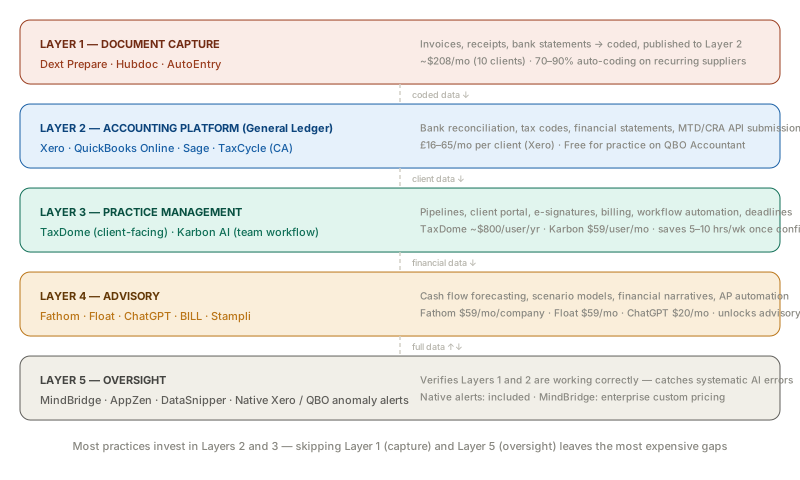
The Five-Layer Framework
Before the tools: the architecture. Understanding what each layer does — and what it does not do — prevents the most common mistake in CPA tech stack building: buying tools that overlap in function or leave critical gaps between layers.
Layer 1 — Document Capture: Gets paper and digital documents into your accounting system accurately, without manual keying. Sits before the accounting platform in the workflow.
Layer 2 — Accounting Platform: The general ledger. Records transactions, categorises them, reconciles bank feeds, and produces financial statements. The foundation everything else builds on.
Layer 3 — Practice Management: Manages the people and process side of the practice — client relationships, workflow, deadlines, billing, document delivery, and team coordination.
Layer 4 — Advisory: Turns the data in Layer 2 into forward-looking insights — cash flow forecasts, scenario models, financial narratives — that clients pay advisory fees for.
Layer 5 — Oversight: Verifies that Layers 1 and 2 are working correctly. Anomaly detection, fraud monitoring, and audit verification that the AI in your stack is not introducing systematic errors.
The mistake most practices make: they invest heavily in Layers 2 and 3 (accounting platform and practice management) and skip Layer 1 (document capture) and Layer 5 (oversight). The result is a practice that processes data faster but not more accurately — and discovers errors at audit time rather than before they compound.
Layer 1 — Document Capture
What this layer does
Document capture is the pre-accounting workflow: collecting supplier invoices, receipts, and bank statements from clients, extracting the relevant data (vendor, amount, date, VAT/tax code, line items), and publishing clean, coded entries to the accounting platform below it.
Without this layer, data enters the accounting platform via manual keying — the most expensive, error-prone input method available. With it, 70–90% of routine document coding happens automatically, and your team reviews exceptions rather than processing everything from scratch.
Primary tool: Dext Prepare
Dext Prepare is the most widely adopted document capture tool in the accounting profession. Its 4.8-star Xero App Store rating reflects consistent production reliability — it works as described across the full range of invoice types, submission methods, and accounting platform integrations.
The key feature for building a connected stack is supplier rules: once configured for a recurring supplier, Dext auto-codes and auto-publishes invoices to the correct GL account without review. On a client with 20 active recurring suppliers, well-configured supplier rules eliminate 70% of the coding that would otherwise land in your team’s queue.
Dext integrates directly with Xero, QBO, Sage, and handles UK-specific VAT codes (INPUT2, RRINPUT, ZERORATEDINPUT, EXEMPTINPUT) accurately — a detail that matters significantly for UK practices where the wrong VAT code on a reverse charge transaction produces an incorrect MTD return.
Full pricing, pros, cons, and competitive comparison: Dext vs Hubdoc vs AutoEntry 2026.
Monthly cost: ~$208/month for 10 clients (annual), scaling with client volume.
Alternative: Hubdoc
Hubdoc is included free with Xero subscriptions and adequate for practices with low document volumes per client. The limitation is automation depth — Hubdoc lacks Dext’s supplier rules and requires more manual review per document. For practices where clients submit fewer than 20 documents per month, Hubdoc’s free tier is sufficient. For higher-volume clients, Dext’s automation depth pays for itself in staff time.
Layer 2 — Accounting Platform
What this layer does
The accounting platform is the general ledger — the single source of truth for every client’s financial position. It receives coded data from Layer 1, manages bank reconciliation, applies tax rules, produces financial statements, and (for UK and Canadian practices) files MTD and CRA submissions directly to HMRC and CRA via API.
The accounting platform choice is the most consequential in the stack. Everything above and below it connects through it. Change the accounting platform and you change every integration in the practice.
US practices: QuickBooks Online Accountant
QBO holds approximately 80% of the US small business accounting market. The Accountant version gives your firm a central dashboard to manage all client files with a single login. The integration ecosystem is the broadest of any accounting platform — nearly every tool in Layers 1, 3, 4, and 5 has a native QBO connector.
Intuit’s 2026 AI features — Intuit Assist for transaction categorisation, the “virtual team of AI agents” for invoice processing and payment chasing — are now ambient in QBO rather than add-ons. For practices whose clients are already on QBO, the AI layer is available without additional configuration or cost.
Monthly cost to practice: QBO Accountant is free for the firm; clients pay their own subscriptions ($38–75/month depending on plan).
UK practices: Xero
Xero is the platform of choice for UK practices serving MTD-mandated clients. MTD ITSA became mandatory from 6 April 2026 for sole traders and landlords with gross income over £50,000 — Xero is fully certified for both quarterly submissions and Final Declaration via HMRC’s API.
JAX (Just Ask Xero), launched September 2025, is the most capable ambient AI feature currently embedded in any accounting platform. It automates bank reconciliation with 80% automation rates on well-established client accounts, handles invoice correspondence, and operates via WhatsApp, email, and mobile — which removes the “client needs to log in to the portal” friction that kills most automation workflows.
Full UK platform comparison including FreeAgent, Sage, and QuickBooks UK: Best AI Tools for UK Accountants HMRC 2026.
Monthly cost: £16–65/month per client (excl. VAT), significantly less on Xero’s Partner Programme.
Canadian practices: QBO Canada + TaxCycle
Canadian practices need two tools at this layer because no single platform handles both bookkeeping and EFILE-certified T1/T2/T3 filing. QBO Canada or Xero CA handles the bookkeeping and GST/HST layer; TaxCycle handles the tax filing layer.
TaxCycle is the only EFILE-certified platform in Canada that handles T1, T2, T3, and T4 in a single subscription, integrates with both QBO and Xero, and produces the CRA-compliant output format that EFILE requires.
Full Canadian compliance stack detail: Best AI Tools for Canadian Accountants CRA 2026.
Layer 3 — Practice Management
What this layer does
Practice management is the operational layer — it manages the workflow that surrounds the accounting work. Client relationships, engagement letters, document collection, task assignment, deadline tracking, billing, e-signatures, and team coordination all live here.
Without this layer, these functions are spread across email, spreadsheets, shared folders, and individual accountants’ mental models of what is due when. The result is the same every year: things fall through the cracks in February, someone discovers a client was never sent their organiser, and the partner personally chases three clients on the last weekend before the filing deadline.
Primary tool: TaxDome (client-facing bottleneck)
TaxDome is the right choice when the primary pain is client-side: getting clients to submit documents on time, sign engagement letters, pay invoices before you release returns, and communicate through a structured channel rather than ad hoc texts and emails.
Its pipeline automation is the core feature — a pipeline built for individual tax return preparation fires: document request sequence → automated reminders → work queue trigger → approval routing → client delivery notification → invoice release. Your team manages exceptions; the routine coordination is automated.
The client mobile app’s 4.9/5 App Store rating across 6,000+ reviews reflects a genuine investment in client experience — when clients find the portal easy to use, they actually send documents on time.
Important caveats: TaxDome requires upfront annual payment, 6–12 weeks of configuration before full efficiency gains, and processes payments through Stripe only. UK practices: TaxDome lacks MTD integration and UK GDPR certification — it is a US-centric product and not recommended as the primary platform for UK client portfolios.
Full review: TaxDome Review 2026.
Monthly cost: ~$800/user/year (billed annually upfront).
Alternative: Karbon (internal bottleneck)
Karbon is the right choice when the primary pain is internal: email overload across a distributed team, unclear task ownership, no visibility into work in progress, and poor handoff between team members.
Karbon’s AI features — email triage and prioritisation, thread summarisation, AI Agents that handle follow-up tasks autonomously — are more developed than TaxDome’s on the internal communication side. For partners managing 200+ open client communications, Karbon AI’s inbox prioritisation is a material quality-of-life improvement.
Monthly cost: $59/user/month (Team plan). AI features currently included during open beta — pricing to increase in future.
For most practices, the choice between TaxDome and Karbon is the most consequential Layer 3 decision. See our Best AI Tools for Accountants 2026 for a direct comparison.
Layer 4 — Advisory
What this layer does
The advisory layer is where the practice’s revenue model evolves. As AI automates Layers 1 and 2, the compliance work that previously justified the billing model becomes cheaper to produce — and clients notice. The advisory layer converts the data produced in Layer 2 into forward-looking outputs that clients cannot get from software alone: cash flow forecasts, scenario models, financial narratives, and business planning frameworks.
This is also the layer with the highest variation across practices. A tax-only firm running individual returns may not use Layer 4 tools at all. A bookkeeping practice with advisory ambitions may generate 30–40% of its revenue from Layer 4 outputs.
General-purpose AI: ChatGPT Plus
At $20/month, ChatGPT Plus is the highest-ROI entry point for advisory capabilities that do not require accounting software integration. A Custom GPT with CPA-specific system prompt handles: client email drafting, plain-language P&L summaries, IRS/HMRC notice response drafts, regulatory research orientation, and month-end narrative commentary.
The constraint to know clearly: ChatGPT cannot connect to your accounting software, cannot execute workflows, and should not receive identifiable client financial data without an enterprise data processing agreement in place.
Full prompt library, system prompt template, and red-zone warnings: ChatGPT Prompts for CPAs 2026.
Monthly cost: $20/user/month.
Cash flow advisory: Fathom (multi-client) or Float (entry-level)
Cash flow forecasting is the most immediately sellable advisory service for most CPA practices. Clients understand it, the value proposition is concrete (“we identify cash shortfalls before they happen”), and the output is impossible for AI to produce without your professional judgement.
Fathom is the right choice for practices managing multiple advisory clients — three-way forecasting (P&L, balance sheet, and cash flow linked in one model), unlimited scenarios, volume pricing designed for multi-client practices, and Commentary Writer that generates written narrative from financial data.
Float is the right entry point if you are starting with one or two clients — deploys in under an hour for any Xero, QBO, or FreeAgent client, produces a useful 13-week direct cash flow forecast immediately.
Full comparison of both plus Dryrun, Spotlight Reporting, and Jirav: Best AI Cash Flow Forecasting Tools for CPA Advisory 2026.
Monthly cost: Fathom from $59/company; Float from ~$59/company.
AP automation (for enterprise clients): BILL or Stampli
For practices managing AP for clients processing 100+ invoices per month, a dedicated AP automation layer generates fee income while eliminating manual invoice processing. BILL ($45/user/month) handles AP and AR with deep QBO and Xero integration and a 3-million vendor network. Stampli (custom pricing) handles more complex multi-step approval workflows with Billy the Bot AI.
For clients at 500+ invoices/month on SAP or Oracle, Vic.ai is the enterprise alternative — though at custom enterprise pricing that requires a significant client to justify. Full comparison: Vic.ai Alternatives 2026.
Layer 5 — Oversight
What this layer does
Oversight is the newest and least-deployed layer in most CPA tech stacks — and in 2026, it is the layer with the fastest-growing risk relevance.
As AI automates Layers 1 and 2, it introduces systematic errors that traditional review procedures are not designed to catch. An AI coding engine that mislearns a vendor’s category repeats that error on every subsequent invoice from that supplier — compounding over months before anyone spots the pattern. Traditional sampling catches the individual transaction anomaly; it misses the systematic pattern across the full population.
The oversight layer provides the verification that the AI in your stack is working correctly.
Native anomaly detection (starting point)
Both Xero and QBO include AI anomaly detection that flags individual transactions outside normal patterns. This catches obvious signals — a supplier invoice for twice the usual amount, a duplicate payment, a transaction outside business hours. For SMB practices, configuring and actively reviewing these alerts is the minimum viable oversight procedure.
The limitation: native tools catch individual-transaction anomalies. They do not detect systematic patterns distributed across the full transaction population.
MindBridge (enterprise audit clients)
For practices issuing audit opinions, MindBridge analyses 100% of financial transactions simultaneously using ensemble AI — Benford’s Law, unsupervised machine learning, and rules-based controls applied in combination. It is compliant with CAS 240 (Canada), ISA 240 (UK/international), and SAS 99 (US).
The 2026 positioning from MindBridge is explicitly about the AI risk problem: “Finance is automating fast with AI. Oversight isn’t.” Continuous monitoring catches systematic AI errors in month two rather than month fourteen.
Monthly cost: Custom enterprise pricing — typically justified only for practices with high-value audit clients to bill against.
Full fraud and oversight tool comparison including AppZen and DataSnipper: AI Fraud Detection for Accountants 2026.
Complete Stacks by Firm Size
Solo practitioner (1 person, 10–25 clients)
The minimum viable AI-augmented stack:
| Layer | Tool | Monthly cost |
|---|---|---|
| Document capture | Hubdoc (included with Xero) | — |
| Accounting platform | Xero Partner Plan (client subscriptions) | £16–65/client |
| Practice management | TaxDome Essentials | ~$58/mo |
| Advisory AI | ChatGPT Plus | $20/mo |
| Oversight | Native Xero anomaly alerts | — |
Total practice cost: $80–150/month (client Xero subscriptions separate). Add Dext ($208/mo) when client document volume justifies the upgrade from Hubdoc.
Time saved vs fully manual workflow: 8–12 hours per week once configured.
Small practice (2–5 staff, 20–50 clients)
The stack that replaces the typical 6-tool sprawl:
| Layer | Tool | Monthly cost |
|---|---|---|
| Document capture | Dext Prepare (10 clients) | $208/mo |
| Accounting platform | QBO Accountant or Xero Partner | $0 (practice), client pays |
| Practice management | TaxDome Pro (2–3 seats) | ~$200–250/mo |
| Advisory AI | ChatGPT Plus (1 seat shared) | $20/mo |
| Advisory forecasting | Float (2–3 clients) | $120–180/mo |
| Oversight | Native anomaly + monthly pattern review | — |
Total practice cost: $550–700/month.
Note: TaxDome is billed annually upfront — the monthly figure above is the annualised equivalent. Factor $2,400–$3,000 cash requirement at renewal.
This combination replaces: separate CRM, document portal, e-signature tool, invoicing software, workflow tracker, and general communication AI. Most practices report eliminating 3–4 separate subscriptions.
Growing practice (5–15 staff, 40–100 clients)
The stack where each layer justifies specialist tools:
| Layer | Tool | Monthly cost |
|---|---|---|
| Document capture | Dext Prepare (25+ clients) | $400–600/mo |
| Accounting platform | Xero Partner or QBO Accountant | $0 practice |
| Practice management | Karbon AI (5–10 seats) | $300–600/mo |
| Client portal | TaxDome Pro (add to Karbon) | $400–500/mo |
| Advisory AI | ChatGPT Team | $50–100/mo |
| Advisory forecasting | Fathom (10–20 clients) | $400–600/mo |
| Close management | Numeric or FloQast (for larger clients) | $800–2,000/mo |
| Oversight | Native anomaly + structured review protocol | — |
Total practice cost: $2,350–4,400/month.
At this scale, the dual Karbon + TaxDome model becomes relevant — Karbon for internal team workflow, TaxDome for client-facing portal. It adds $400–500/month in tool cost but eliminates the coordination overhead that becomes the primary bottleneck as team size grows past 8.
For practices with enterprise audit clients: add MindBridge at custom pricing, billed to the audit engagement.
What the 2026 stack shift looks like in practice
Three years ago, a 10-person CPA firm’s tech stack was: QuickBooks Desktop → email attachments for documents → shared network drive → Excel close tracking → phone calls for client follow-up. Monthly tech cost: $200–400. Monthly staff time on process administration: 25–35 hours per person.
Today’s equivalent 10-person firm runs the stack above. Monthly tech cost: $3,000–4,500. Monthly staff time on process administration: 8–12 hours per person. The cost of the stack has increased by $2,500–4,000/month. The capacity freed per person is 15–25 hours/month. At a fully-loaded staff cost of $35–50/hour, that is $525–$1,250 per person per month in recaptured capacity — multiplied across 10 staff, the math is not close.
The mistake is treating tech stack cost as an expense line. It is a capacity investment with a specific, calculable return.
The Five Most Common Stack Mistakes
1. Layer 1 and Layer 5 are missing. Most practices invest in Layers 2 and 3 (accounting platform and practice management) and skip document capture and oversight. The result: data still arrives via manual entry on one end, and no one is verifying the AI’s output on the other. The efficiency gains from Layers 2 and 3 are real but incomplete.
2. Practice management is configured for demos, not production. TaxDome and Karbon both require 6–12 weeks of configuration before they deliver their advertised value. Practices that buy them, configure them superficially, and expect immediate efficiency gains are the ones that report disappointment. The configuration investment is the product — the subscription is just access to the platform to build on.
3. Accounting platform locked in from habit, not evaluation. Many practices run QBO because they have always run QBO, and their clients are on it. For UK practices, this is actively problematic — QBO UK lacks the MTD ITSA depth, VAT code accuracy, and FreeAgent integration that UK-focused platforms offer. Platform inertia is the most expensive form of technical debt in a CPA stack.
4. Advisory layer is absent or accidental. Cash flow forecasting tools (Fathom, Float) are not expensive relative to the advisory fee potential they unlock. A $59/month Fathom subscription deployed across five advisory clients at £300/month each generates £1,500/month in new revenue. The ROI calculation is simple. The barrier is not economics — it is the practice not having built the advisory service or the client communication around it.
5. Vendor risk is ignored until it is not. The Botkeeper shutdown in February 2026 demonstrated what practice-level vendor risk looks like in practice: a well-funded platform closes in days, leaving firms with active client workflows that need migration. Mid-tax-season. The lesson: no workflow-critical tool should be a single point of failure. Data should live in a format exportable from any platform at any time, and practices should have a documented contingency for each tool’s failure. Full context on the Botkeeper story and replacement options: Botkeeper Alternatives 2026.
The Orchestration Question
The last technology cycle was about adoption: moving systems to the cloud, digitising documents, and bolting on automation. The 2026 cycle is about orchestration — bringing platforms, people, and processes together as a cohesive system.
The practical version of that: a document arrives in Dext → Dext codes it and publishes it to Xero → Xero reconciles the transaction against the bank feed → TaxDome’s pipeline advances to the next stage → Fathom updates the client’s cash flow model → the accountant reviews a flag from native anomaly detection and signs off. No manual handoffs. No re-keying. No “I thought someone else was handling that.”
That is not a fantasy stack — it is what practices running the tools in this guide are doing today. The architecture requires deliberate integration choices at each layer boundary, which is why this guide was written around layers rather than around individual tool features.
The question is not which tools to buy. It is whether the tools you buy connect in a way that makes the whole practice more capable than the sum of its parts.
Deep-Dives by Category
This article is a framework. Each tool recommendation links to a dedicated article with full pricing, pros/cons, and alternatives:
Document capture: Dext vs Hubdoc vs AutoEntry 2026
UK accounting platforms: Best AI Tools for UK Accountants HMRC 2026
Canadian compliance stack: Best AI Tools for Canadian Accountants CRA 2026
Practice management: TaxDome Review 2026 | Best AI Tools for Accountants 2026
AP automation: Vic.ai Alternatives 2026
ChatGPT for CPAs: ChatGPT Prompts for CPAs 2026
Cash flow forecasting: Best AI Cash Flow Forecasting Tools for CPA Advisory 2026
Month-end close: AI Month-End Close Tools for CPA Firms 2026
Financial close management: FloQast vs BlackLine 2026
Fraud detection and oversight: AI Fraud Detection for Accountants 2026
Bookkeeping automation alternatives: Botkeeper Alternatives 2026
Q1 2026 industry news: AI in Accounting Q1 2026
Prices and features verified as of May 2026. Tech stack costs are estimates based on published pricing and practitioner surveys — actual costs vary significantly based on client volume, negotiated contracts, and plan selection. Verify current pricing directly with each vendor before purchase.
This is not financial or legal advice. Last reviewed: May 2026.